
Imagine you ask a colleague: “Prepare the workshop website for me, with an appointment form, and leave it ready for review.” A good colleague doesn’t come back every two minutes to ask what to do now. They move forward, show you the result and only call on you when they need a decision from you. That is what we have added to the ADRI chat, with a clear brake at every step.
Suggest: your next reply, already written
Sometimes you don’t need ADRI to work on its own, but to save you typing. The spark button reads the end of the conversation and writes in the box what you would say now: the next step, the answer to what it has asked you or the missing decision. If you had already started typing, it improves your draft.
What matters is what it doesn’t do: it never sends it. You read it, change it if you want and press Send yourself. If you keep typing while ADRI is thinking, your text is left untouched. It is an aid, not an autopilot.
Auto mode: you give it a goal
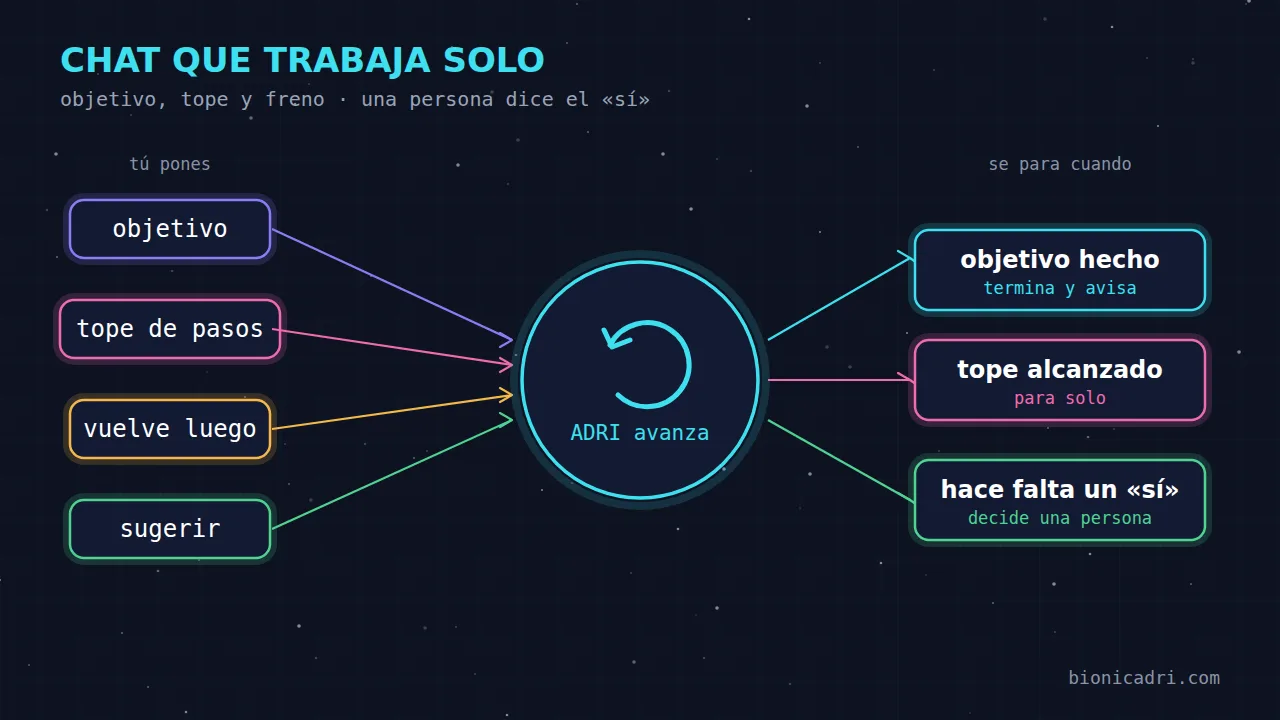
The rocket is the autopilot, but with conditions. You write the goal, choose how many steps it can take at most (10 by default, 20 as the maximum) and press Start. The goal enters the chat as the first message. When ADRI replies, Auto mode looks at the conversation and writes the next message that moves it closer to the goal. And so on until it finishes.
- You can tell what you wrote. Auto mode messages are marked “Auto mode · step N”.
- It carries on without you. It works on the server, so you can close the chat or turn off your computer. When you come back, you can see which step it is on and you have the Stop button.
- A good goal says what must be done. “Build me the workshop website with an appointment form and leave it ready for review” works better than “improve the website”.
- Only the chat owner can use it, and a chat has at most one Auto mode running.
When it stops on its own
An assistant that works on its own is useful if you know when it is going to stop. Auto mode stops in these cases:
- the goal has been achieved;
- it reaches the step limit you gave it;
- ADRI asks you to confirm something, or you need to make a decision or provide a detail;
- it was about to repeat the same message, which usually means it has got stuck;
- something goes wrong or the AI spend cap is reached.
In all these cases, it notifies you via the bell and the chat bar says why it stopped. And if you type in that chat, Auto mode stops straight away: when you’re there, you’re in charge.
The “yes” comes from a person
This is the brake we care about most. Issuing an invoice, accepting a quote, sending a message to a customer or deleting data in bulk are actions with consequences. For these, ADRI shows you a summary and waits for your confirmation.
The key rule: neither ADRI nor an automatic turn can give that “yes”. For ADRI, a message from Auto mode does not count as yours. It cannot confirm a critical action or authorise recipients. That is why, when Auto mode reaches one of those actions, it stops and tells you. You reply in the chat and, if you want, you start it again.
The same applies to messages to third parties: ADRI only sends to recipients with verifiable origin. Taking an automatic step does not open a door that was closed. For how other important decisions are recorded and protected, see the article on records that cannot be deleted.
Come back later: return to the same chat at the scheduled time
The third piece solves another problem: what cannot be done right now. A website that isn't responding, a piece of data that hasn't been published yet, a payment that hasn't arrived yet. Instead of asking you to remind it, you tell it “retry in 10 minutes” or “check it tomorrow”, and ADRI returns to the same chat at that time, with everything you had discussed.
- It's visible. A bar in the chat with the time and reason, and a Cancel button. At the scheduled time, its response appears below like any other.
- You stay in control. If you write before it comes back, ADRI reads the whole chat when it resumes and decides whether it still makes sense. If you tell it “it's no longer needed”, it cancels it.
- With limits. Up to 5 pending turns per chat, between 30 seconds and 14 days. The whole chain of turns counts as a single task for the spending limit: if it runs out, ADRI stops and tells you.
- Destructive actions still require your “yes”. An ADRI turn does not count as you having replied either.
It is not the same as the timer in the bar, which leaves your message for later, nor as an AI schedule task. Here, ADRI is the one that resumes its own work in the conversation where it left off.
The spending brake
An autonomous assistant without a limit would be a bad idea. Each step of Auto mode is an ADRI turn plus a short task that decides the next message, and everything counts towards your AI usage, which already includes the platform. The step limit is your first brake; the spending limit is the second. If either one runs out, ADRI stops and lets you know.
When to use each one
- Suggest, when you know what you want but don't feel like typing it.
- Auto mode, for multi-step jobs with a clear result: a website, a report, organising some data.
- Come back later, when something depends on time or a third party.
- You, whenever money, customers or data are involved.
You can see the whole chat, with its shortcuts, files and rooms, on the ADRI chat page. If you want to understand how work is divided among specialists and who reviews each decision, read how ADRI decides and who reviews its work.
Next step
Want to see Auto mode with a real task from your company? Request a demo and we'll try it together, or try it now in your own account.
- AI chat
- Auto mode
- Human control
- ADRI