The same cent as your sheet
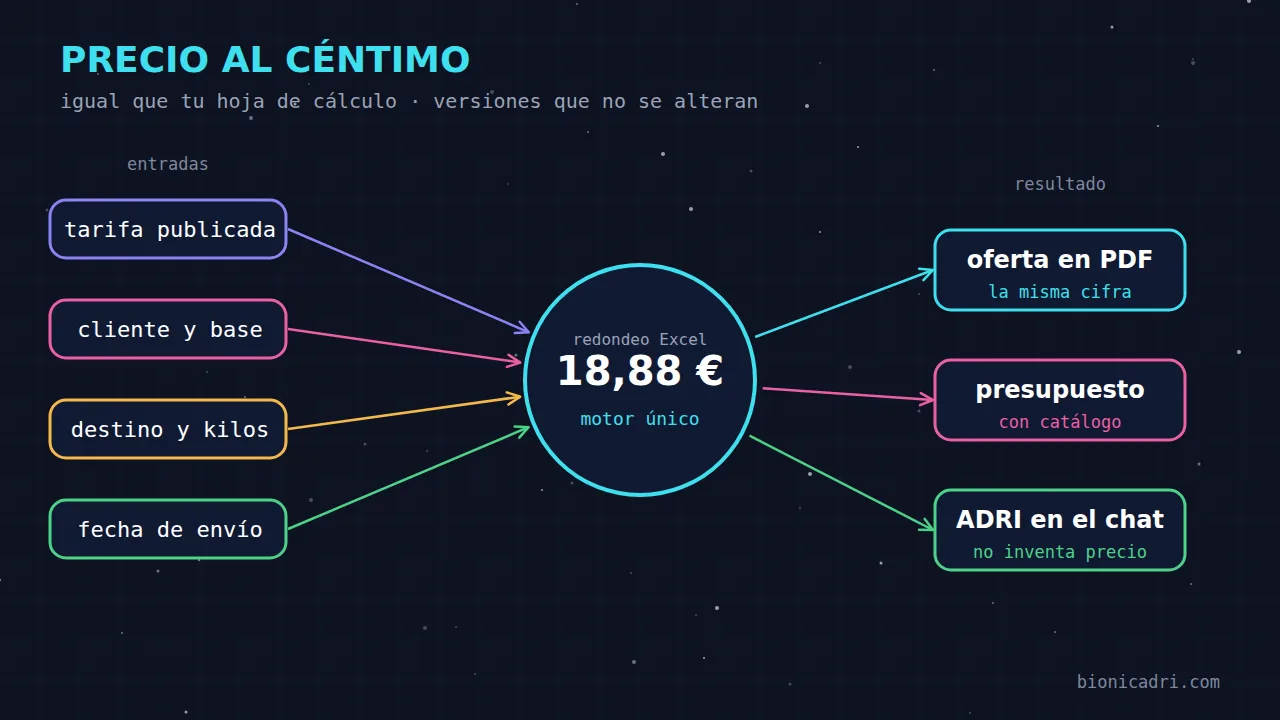
The calculation rounds as Excel does. If your sheet says €18.88, here it comes out as €18.88. It works for rates by kilos and zone and by pallets and zone.
Transport and logistics
Quote shipments by pallets or by kilos and zone without opening a spreadsheet. The calculation gives the same figure as yours, applies each customer's conditions and, if you want, you ask ADRI for it by chat. It is a module for transport companies and is activated on request.
The problem
In many transport companies, the price comes from an Excel sheet with dozens of columns: zone, kilo bracket, each customer's base rate, discount, fuel. It is slow, depends on whoever knows how to use it, and one wrongly copied cell is enough to undercharge or send an offer that cannot then be upheld.
This module stores your rates and each customer's conditions, and always calculates with a single rule. The screen, the PDF offer, the quote and ADRI all give the same amount, because all four use the same calculation.
What it does for you
The calculation rounds as Excel does. If your sheet says €18.88, here it comes out as €18.88. It works for rates by kilos and zone and by pallets and zone.
A published rate cannot be changed or deleted. To change prices, you import a new version with its effective date. That way you always know what prices each offer was issued with.
Each customer has their rate, base rate, discount and, where applicable, their fuel surcharge. When conditions change, the history is kept: nothing is overwritten.
You send ADRI the Excel or CSV in the chat. ADRI converts it and leaves it as a draft, with a summary and any errors. You review the prices and publish.
Increase or decrease all costs by a percentage, for example the annual increase. You see some cells before and after and publish a new version. The previous one remains untouched.
In a single quote you can mix shipments calculated with the customer's rate and services from your catalogue, such as special packaging. Each shipment is a line with its price.
How it works
ADRI converts your Excel or CSV. You review the summary and publish it with the effective date.
You choose what happens if a price falls below cost and record the fuel price for each month.
Rate, base rate, discount and fuel surcharge for each customer, from their record or from the module screen.
You enter the destination and kilos or pallets and see the itemised price: carriage, surcharges, fuel and total excluding VAT.
Generates the PDF offer with its number or adds the shipment to a draft quote.
ADRI by chat
You ask ADRI as you would a colleague. She chooses the customer's rate and conditions and shows you the breakdown with her warnings. The amount always comes from the module's calculation: ADRI does not make up prices.

ADRI
Working
How much does it cost to send 3 pallets to Valencia for this customer?
gestorFinds the rate and the customer's terms
gestorCalculates with the module's engine, without making things up
Here is the breakdown: carriage, month's fuel and total excluding VAT. Shall I prepare the quote as a draft?
Control and security
Only those with cost permission see the cost of each cell and the margin over cost. By default, admin and management. The salesperson calculates and quotes without seeing them.
Each rate base has its maximum discount, and a higher one is rejected. If a price were to fall below cost, you choose whether it is blocked or a warning is shown.
If the month's fuel price is missing, a destination is 'on request', or the requested service does not exist for that zone, the calculation says so. It does not charge 0% or change the service silently.
Module for carriers: it is not enabled in every installation. It is activated on request, after a demo with your own rate.
Frequently asked questions
That is the aim of the calculation: it rounds like Excel and works with exact amounts, without the cent errors of standard decimals. Even so, during setup we compare several real shipments with you against your spreadsheet before using it.
Rates by kilos and zone, and by pallets and zone. It supports its own surcharges (such as dangerous goods, cash on delivery or declared value), fuel by bands or fixed, volumetric weight and economy or premium service.
No. A published version is closed. To change prices, you import a new version, or apply a price adjustment with preview, and choose the date it applies from. The previous one closes the day before.
Nothing. A quote is saved exactly as it was sent. When a customer's terms change, the previous ones are closed and the history is kept, and quotes already created are not touched.
No. ADRI selects the customer and rate and reads the result, but the amount is always provided by the module's calculation. Before creating a quote, it asks you for confirmation.
Only those with cost permission. By default, admin and management, and you can change this from Roles. The salesperson can calculate and quote without seeing the cost.
It is a module for transport companies and is not enabled as standard: it is activated on request. Ask us for a demo and we'll look at it with one of your rates.
Keep reading
No-obligation demo
Tell us how you work today and we'll show you how ADRI would do it with your data. No obligation.