
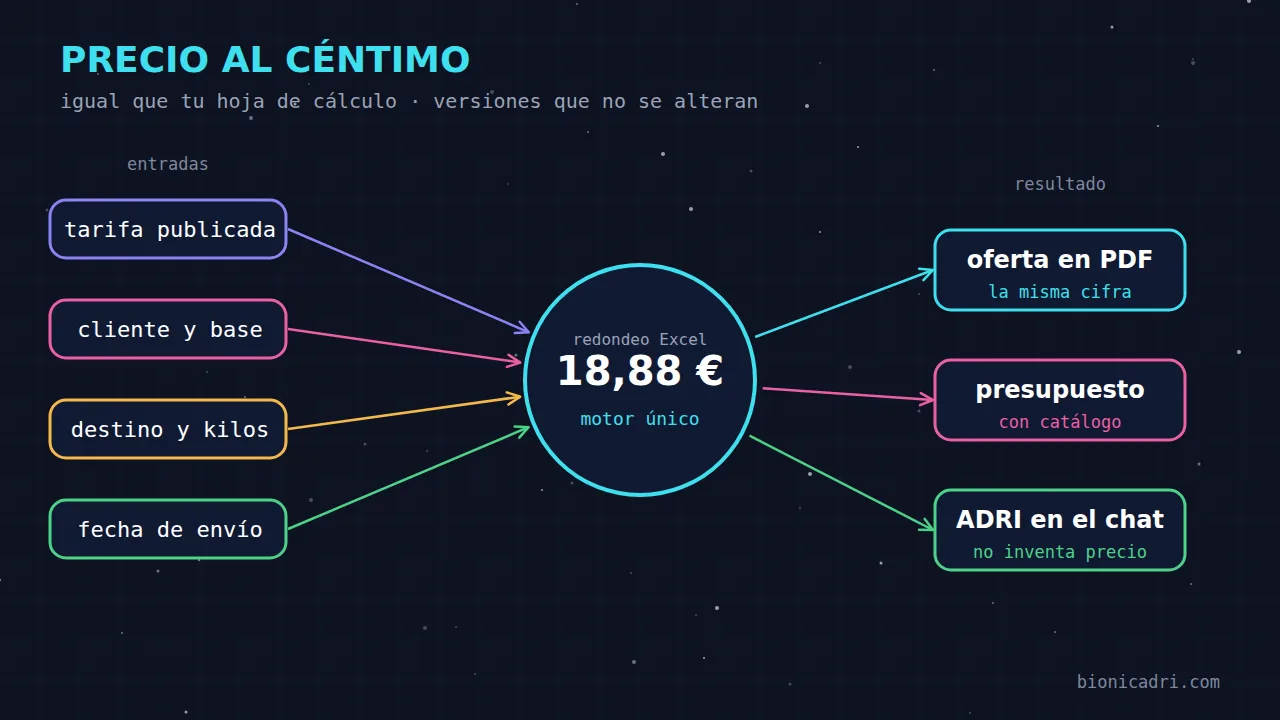
Imagine that your spreadsheet says that sending two pallets to Madrid costs €41.13 and the new system says €41.12. One cent. Nobody goes bankrupt over that, but the salesperson stops trusting the system, the customer who kept your previous quote asks what has changed and someone ends up checking every quote by hand. It is the opposite of what automation was meant to achieve.
That is why the first requirement of the AI-powered transport rates module was not convenience or chat. It was that the price came out the same as in the company's sheet, cell by cell. This is what we did to achieve it.
Why the sheet rules
In a transport company, the rate sheet is effectively the contract. It has been refined over years: the zone for each destination, the price for each weight band or each pallet, the factor for each base, the discount agreed with each customer. If the new system calculates differently, the company has two versions of the truth and does not know which one to defend to the customer.
We start from the assumption that the spreadsheet is right. The system's job is to reproduce it, not correct it. If the spreadsheet has an error, it is fixed in the rate, and the system picks it up in the next version.
The formula, and the detail that breaks everything
A customer's price comes from a simple formula: the cost of the cell, multiplied by the factor for their base, minus their discount, plus a margin per cell if there is one. Up to that point, anyone could do it. The problem is in the rounding.
Excel does not round the exact value. It first truncates it to 15 significant figures and then rounds to cents. It looks like a nuance and it is not. An intermediate result such as 1.0049999999999999999 stays at 1.01 in Excel, whereas 1.00499999999999 stays at 1.00. If you round directly to cents with the usual function in a programming language, in cases like these you lose a cent, and you do it precisely in the boundary cells where the spreadsheet and the system should match.
Our calculation copies that behaviour: first the 15 significant figures and then rounding to cents, with the spreadsheet rule. Negative amounts, such as a margin that subtracts euros per cell, follow the same rule.
No floating-point decimals
The second decision was never to use computers' floating-point decimals. They are fast, but they do not store quantities such as 0.1 or 4.43 well: they approximate them, and from that approximation come the one-cent differences nobody can explain. All the calculation uses exact decimal arithmetic, and amounts travel as decimal text between the calculation, the quote and the chat. A number does not become approximate along the way.
One more common-sense rule: no cell can be left at zero euros or less. And if a shipment's price were below cost, the company chooses in settings whether the system blocks it or only warns.
Tests that compare against the spreadsheet
A well-written formula is not enough if nobody checks it. The module has automated tests that recalculate complete price grids and compare them with the expected values: kilo rates with their zones, brackets and bases, and pallet rates with their zones and columns, with several combinations of base, discount and margin. That is hundreds of cells, and any one-cent difference makes the test fail. There is also a separate suite with twelve edge cases, chosen precisely because normal decimals and standard rounding lose a cent there.
To be clear: the reference cases in these tests are sample data, built with the same formula that has already reproduced to the cent the rates of real transport companies. No company's data is carried inside the program. And before a company uses it, it is compared with its own spreadsheet: in the first rollouts, hundreds of shipments came out to the same cent as the company's spreadsheet.
A published rate is not touched
The cent is no use if tomorrow someone changes a cell and yesterday's offer can no longer be explained. That is why rates work by versions. While a version is in draft it can be reviewed; when it is published with its effective date, it cannot be changed or deleted. To change prices, a new version is imported or a revaluation is applied, and the previous one is closed the day before.
The price adjustment, for example an annual increase of 3.5%, first shows a preview with fields before and after, and only then is it published. Customers keep their discount and the general conditions still apply.
The same happens with customers. When one customer's conditions change, the previous ones are closed and the history is kept, without overwriting anything. And a PDF offer is saved exactly as it was issued: if costs change tomorrow, the offer sent still says the same thing. Quotes that have already been created do not change.
ADRI asks, the calculation answers
Here comes the part that is most worth making clear. When you ask ADRI “how much does it cost to send 3 pallets to Valencia for this customer?”, it does not do the calculation. A language model can explain a price very well, but it is not a reliable calculator, and where money is concerned, that is non-negotiable.
ADRI chooses the customer, the rate and the discount, calls the same calculation used by the screen and shows you the result with its warnings. If the month's fuel price is missing, or the destination is “on request”, or the requested service does not exist for that area, the calculation says so and ADRI tells you; it does not fill the gap with an estimate. It does not publish rates either: that is done by a person. It is the same idea we explain in who decides and who reviews in ADRI: AI proposes and understands what you ask of it, and the rules that cannot fail are run by tested code.
If you ask it for a quote that combines shipments and services from your catalogue, for example two special packaging items and a 40-kilo shipment to Madrid, the shipments are recalculated using the customer's rate and the packaging items go at their catalogue price, all in a single draft. Before creating it, it asks you for confirmation. The rest of the journey, from quote to cash, is covered in the article on the quote-to-cash ERP.
What your business gains
- A single price. The screen, the PDF offer, the quote and the chat show the same figure.
- Fewer copy errors. No one drags a cell from one sheet to another.
- Explainable history. You know which version and which conditions each quote was issued with.
- Protected margins. Only people with cost permission can see the cost of each field.
- Speed. A salesperson quotes directly in the chat, with the usual figure.
It is a module for transport companies; it is not enabled in every installation and is activated on request. If you want to see how it behaves with one of your rates, request a demo. And if you are looking for the rest of the sales tools, see quotes and contracts with AI.
- Transport
- Rates
- Quotes
- ADRI