
Every server receives visits that nobody invited. Automated programs try passwords, scan ports and request files that should not exist on a website. Most achieve nothing, but it only takes one to get it right. The Sentinel is there so that you find out when it happens and so that the server reacts without waiting for someone to read the logs.
It is ADRI's defensive piece. You already know the offensive one: the security agent that audits your infrastructure when you ask it to. The Sentinel does not wait for you to ask: it always watches.
Why we built it
Today's attacks are launched by programs, and increasingly by AI agents, which do not get tired or sleep. An antivirus that compares files against a known list is too late for that. Our idea was the opposite: a small watchman inside each machine that looks at behaviours, not signatures, and that keeps working even if the rest of ADRI is stopped.
We started in August 2026 with a prudent rule: detect and alert, without touching anything. When the real tests against the firewall went well, we activated the automatic response, with the safeguards we tell you about below. That same month we deployed it on the servers we manage for our clients.
What it monitors
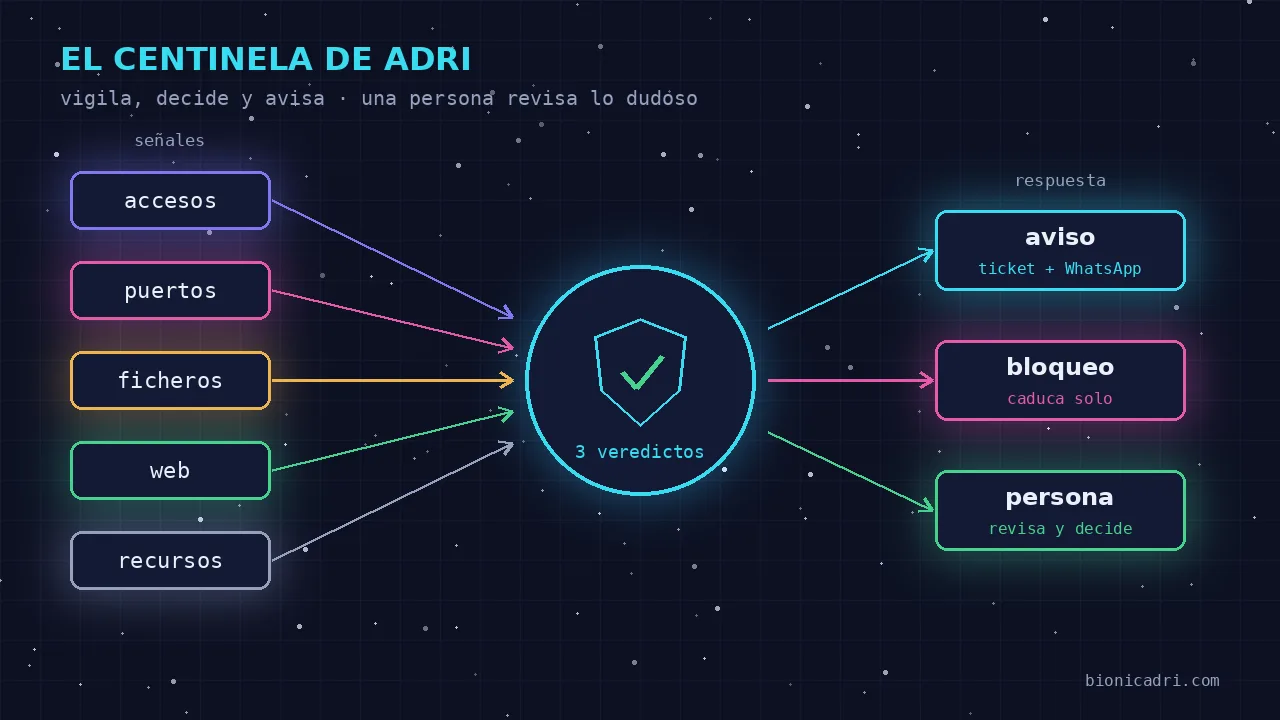
The Sentinel checks the server continuously, at short intervals. It looks at these signals:
- Brute-forced passwords. Failed remote access attempts repeated from the same address. It has memory: a slow attack, with few attempts each time, also adds up.
- Access from an unknown location. An access that does get in, but from an address that is not on that server's trusted list. It is the typical sign of a stolen key, which never fails. It works when the server has that list configured.
- Port scans. Someone knocking on many doors to see which one is open. It looks at the real state of connections, including those left half-open.
- Scan followed by access. The same address that first explores and then gets in.
- Changes to sensitive files. Authorised access keys, user accounts, scheduled tasks or administrator permissions. This is where an intruder leaves their way back in.
- Backdoors. Programs that listen, or that connect outbound, on typical remote-control ports used by attackers.
- Web probes. Requests that look for configuration files, admin panels or database injections.
- Resources. Real use of processor, memory and disk.
How it decides: three verdicts
Each pass ends in one of three states. The key is not to treat a spike in work the same as an attack.
| What it sees | Verdict | What it does |
|---|---|---|
| Nothing out of the ordinary | All good | Nothing |
| Only high resources | Monitor | Notes it, without alarm. A backup or a large report also fills up memory. |
| Hostile traffic or a changed sensitive file | Probable attack | Alerts and, if applicable, responds |
We tell you straight: today that decision is a simple rule. If there is a hostile signal, it is a probable attack. It still does not cross-reference in time a resource spike with what a specific address did ten minutes earlier.
What it does on its own
When the verdict is 'probable attack', Centinela follows these steps:
- Logs it. Each alert is kept in a history on the server itself.
- Alerts a person. Opens a ticket on the platform and sends a WhatsApp. That alert does not go through the AI: it goes out even if ADRI is down. It also uses a closed template, with known attack types and verified IP addresses. An attacker can write text in the server logs, but that text never reaches your message.
- Blocks the attacking address in the server's own firewall, only in clear network cases: brute-force password attempts, scans and access from an unknown location. The block expires on its own after a while, so a mistake does not leave anyone out forever. Instead of blocking, it can be configured so that responses to the attacker go out in dribs and drabs; it comes turned off.
- Wakes up an ADRI agent, if activated, to review the server. Only when there is an attacking address and with a wait between alerts, so as not to waste AI in a loop.
- Sets a trap. A decoy port accepts the connection, does not give access to anything, responds with junk slowly and notes who called.
An alarm, a warning: the same alert from the same address is not repeated until after a while. And Centinela only says 'blocked' when the firewall confirms that it blocked it. If it cannot, it says so.
What it leaves to a person
- Changes to sensitive files. It alerts with maximum priority, but does not block anyone and does not accept the change as valid. If it accepted it on its own, it would learn the key left by the intruder as normal. A person reviews and decides.
- Web probes, backdoors and strange outbound connections. They generate an alert, not automatic blocking. There, a wrong action can cut off something legitimate.
- Entering other servers. Centinela monitors the machine it runs on. It does not connect on its own to other machines to touch them.
- Counterattack, never. Responding to an attack by attacking the origin is a crime in the European Union. And almost always that origin is the computer of another victim that someone has hijacked. What we do is defend our home: block, slow down, set traps and keep evidence so we can report it.
How it avoids false positives and doesn't leave you out
A watcher that blocks by mistake is worse than the attack. That is why there are addresses that Centinela never blocks:
- the network that distributes your website over the internet, because blocking it would bring down the website itself;
- the private network from which we manage the servers;
- the trust addresses of that server and the machine itself;
- any address with an admin session open at that moment.
We also learn from failures, and we'll tell you about two real ones. In August, two alerts of «scan followed by access» arrived early on a Tuesday. They were not an attack: the administrator's own session counted as both a scan and an access, so any legitimate entry accused itself. We fixed it so that the scan has to really be one, as in normal detection. The rule we were left with: the two clues of a suspicion have to be independent.
The other: a server's trust list of addresses slipped into the common configuration. On another server it flagged a legitimate access as suspicious. It did not block it, because it came from the protected network, but it caused noise. Since then that list is specific to each server and comes empty by default.
The same with normal connections that the server opens outwards: in the first tests they looked like a scan. Now they don't count.
Limits worth knowing
- It does not see all types of scanning equally well. Some leave very little trace in what it looks at today.
- The decision is a simple rule, as we explained above, not an analysis of the full context.
- Alerting about an access from a new location requires the server to have its trust list.
- It does not replace the basics: updates, two-factor access and backups. It is one more layer, not an absolute shield.
The code goes through repeated reviews, several of them with different models that review each other, the same idea we explain in who decides and who reviews in ADRI. Those reviews have found real errors and we have corrected them. More will keep appearing, and that is why we keep doing them.
What your company gains
- You find out without looking at logs. Ticket and WhatsApp with what happened and from where.
- The server reacts on its own only in clear cases, at night or at weekends, and the block is undone automatically if it was a mistake.
- There is evidence. The history of alerts and the trap can be used to review or to report.
- It works even if the AI is down. The watcher does not depend on ADRI to alert you.
If you want to know how we protect access and data as a whole, you'll find it in security and compliance. To see what else the agent team does, look at what ADRI does or try it in the chat with ADRI. And about where your data lives, see our infrastructure in Europe.
Next step
Do you want to see how an alert from Centinela arrives and what it contains? Request a demo and we'll show you.
- Security
- Servers
- Intrusion detection
- ADRI