
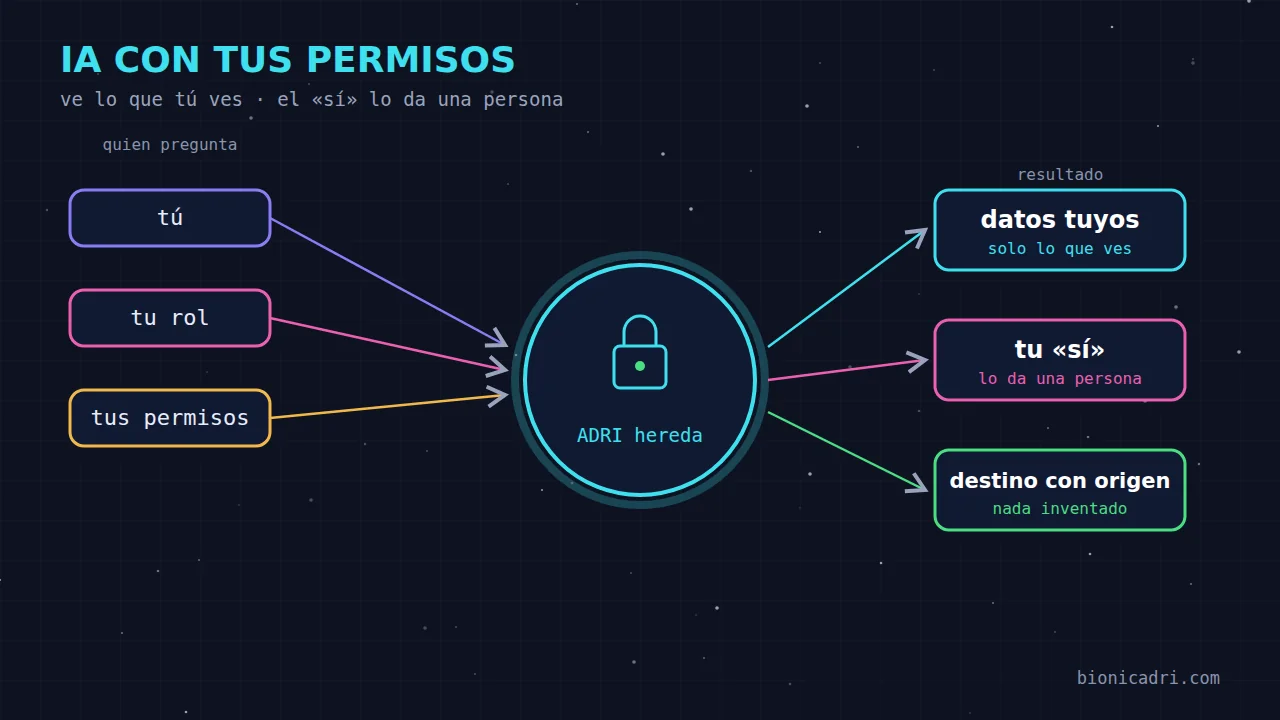
Imagine you hire a very capable person to help the whole team. You give them an office key, and it turns out that this key also opens the management office, the payroll archive and the contracts drawer. No one would hire them like that. Well, with AI assistants exactly that happens more often than it seems: they connect to “everything” with a single credential and, from that moment on, whoever asks them sees what the AI can see, not what they are entitled to see.
At BionicAdri we have done the opposite. ADRI, the platform assistant, does not have a master key. It works with the permissions of the person speaking to it. This article explains what that means in practice and what your company gains.
The problem: AI with access to everything
Think of a salesperson who, from the chat, writes: “How much does a colleague in administration earn?”. If the AI has full access to the database, it has two options, and both are bad. Either it answers, and you have leaked a payslip to someone who should not have seen it. Or it has been programmed to refuse certain questions with loose rules, which someone will end up getting around with a clever phrase.
The flaw is not in what the AI “wants” to do. It is in what it can do. If it can open that information, sooner or later someone will get it to open it.
The solution: ADRI inherits your permissions
At BionicAdri, ADRI does not access the company's data on its own. It reads it through the panel, the same one you use, and with the permissions of whoever is asking. If you cannot open something on screen, ADRI cannot open it for you either.
And it does not write to the database on its own either. When ADRI creates a quote, adds a contact or records a visit, it does so through the panel, with the same validation rules and the same log as if you had done it by hand.
Let's see how this looks in everyday examples:
| Who is asking | What they ask | What they receive |
|---|---|---|
| A salesperson | 'How much does my colleague in administration earn?' | No amounts. ADRI explains which data they can access. |
| A salesperson | 'Which customers have not had a visit for a while?' | Only those in their portfolio, not those of their colleagues. |
| An employee | 'What expenses have I uploaded this month?' | Their own. Not other people's. |
| An HR person | 'Who is absent today and why?' | The list and the reason, because their role manages deactivations. |
| An administrator | 'Give me a colleague's record' | Basic details, without ID number, phone number or address. |
Notice what does not happen: ADRI does not stay silent or lie. If you cannot see something, it tells you and suggests what it can do. The answer is honest and safe at the same time.
A person's 'yes' on what matters
Permissions answer 'can you see this?'. Another question is missing: 'do you want this to actually happen?'. There are actions that cannot be undone or that affect money and third parties: issuing an invoice, accepting a quote, deleting data in bulk.
For those, ADRI shows you a summary of what it is going to do, with amounts and affected parties, and waits for your response. The key thing is who can give it: only a person. Neither ADRI nor an automated task can give that 'yes'.
This covers cases that seem subtle and are not:
- If you leave ADRI with a long objective in auto mode and it reaches a step that requires confirmation, it stops and notifies you. A message from auto mode does not count as if you had written it yourself.
- If ADRI returns to a chat later, because you asked it to 'check it tomorrow', that return visit cannot confirm anything on your behalf either.
- And there are things ADRI simply does not do. It does not delete customers, leads or sent quotes: it deactivates them or cancels them with a reason, as you would on screen.
Messages only to verifiable recipients
Another risk of an AI that writes on your behalf is the recipients. Malicious text embedded in an email or on a website may try to make the assistant send information to an address that does not belong to anyone in your company. With this kind of assistant, the attack does not need to be sophisticated: it is enough for the AI to trust an address it should not have trusted.
That is why ADRI only sends to recipients with a verifiable source:
- those that you type into your message;
- those that come from your data in the panel, such as customers, leads, contacts or colleagues;
- those that ADRI has shown you before and that you have seen.
An address or phone number that suddenly appears, with no one knowing where it came from, receives nothing. ADRI tells you about it and you decide. The same check applies to email, WhatsApp, Telegram and calls to third parties: changing channel is not a back door.
One example: you ask it, 'let all customers know about the change in opening hours'. If the list includes an email address that ADRI took from a website and that is not in your data, that email address stays out until you confirm it.
Every chat in its own space, and your files are yours
Permission inheritance also applies to files. What ADRI generates or receives in a conversation lives in a private space for that chat, outside the public web, and is only opened with a link that the application generates for you and that expires. ADRI's internal working notes are not shown.
‘My files’, your personal folder, is private: not even administrators can see it. ADRI works in it only on behalf of its owner and with limits per message.
When someone requests their rights via WhatsApp
Customers and contacts also have rights. If a person writes to ADRI ‘unsubscribe me’ or ‘delete my data’, the request is processed and logged. Unsubscribing from marketing messages is applied immediately. Deletion requires the person to confirm it, their identity to be verified, and the person handling it to have permission over that record.
Identity is verified carefully: on WhatsApp, using the verified phone number of the person writing. By email or Telegram, the sender cannot be verified, so a person reviews it. And what the law requires to be kept, such as invoices, is kept. The dashboard shows how many days are left in the one-month period. Only a fingerprint of the person is stored so they are not written to again, never the text of their message.
What your company gains
- GDPR with less risk. Personal data doesn't get out through a well-worded question. Anyone who does not have the right to see it does not receive it, neither from ADRI nor from the dashboard.
- Simple auditing. What ADRI does goes through the dashboard and leaves the same trail as what you do. Access to sensitive data is logged. If you need to prove who did what, the log exists. In this article on protected records we explain how the history is protected.
- Team trust. A team uses a tool better when it knows it isn't a snitch with a master key. If the salesperson knows that ADRI won't show their payslip to a colleague, they stop fearing it.
- Frictionless control. Permissions are the usual ones, the ones you already manage with the platform's roles. There is no second list to maintain for the AI.
What we don't promise you
No tool guarantees zero risk. Coverage depends on roles being properly assigned, and that is each company's responsibility: if you give someone permission to view payroll, ADRI will show it to them, just as the dashboard would. What we do ensure is that the AI never sees more than the person talking to it, that critical actions wait for a person and that messages only go out to destinations with an origin.
For a complete overview of the platform, with two-factor authentication, backups and compliance, see the BionicAdri security and compliance page. If you are interested in the technical side of infrastructure audits, we cover it in enterprise security with AI agents. And if you want to see it with your own roles, request a demo: we ask ADRI the same thing with two different users and you can see the difference.
- Security
- Permissions
- RGPD
- AI in the company