No plugins
What you need is already included
SEO, languages, cookies, forms, backups and 2FA are part of the program. There are no plugins to find, install or update one by one.
Lightweight CMS with MCP
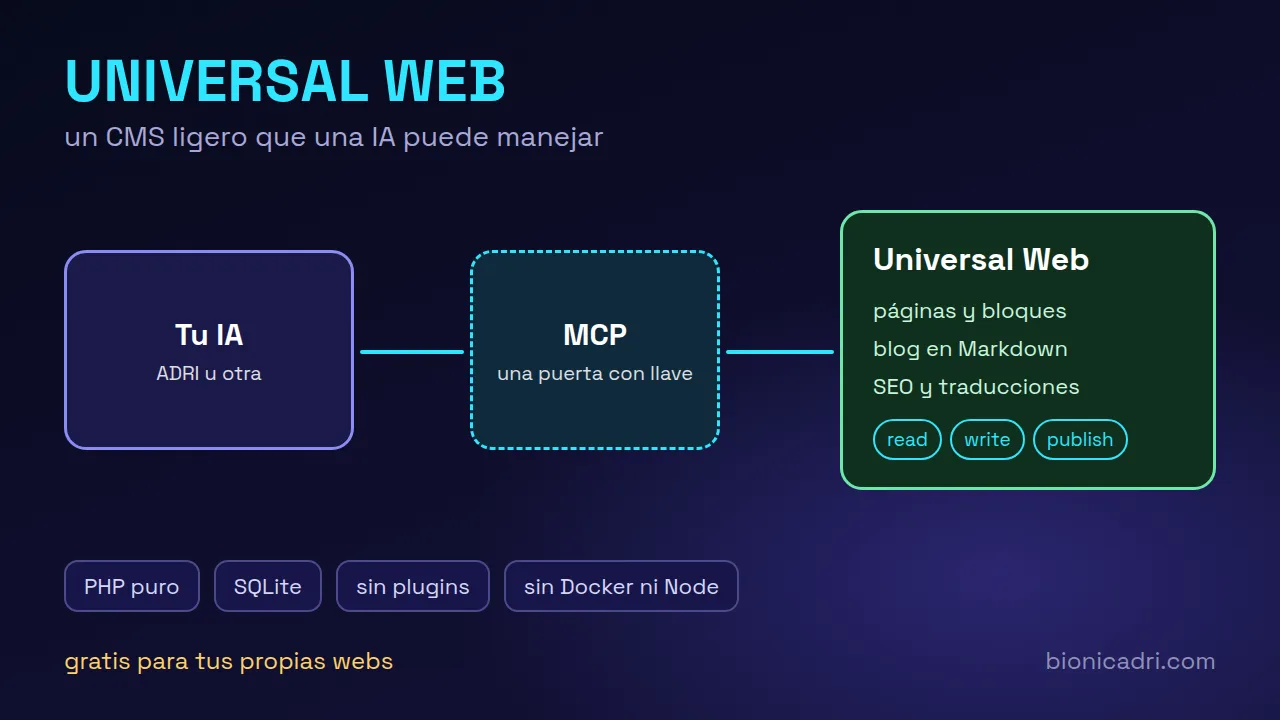
A lightweight WordPress alternative: it installs on cheap shared hosting, needs no plugins or separate database, and comes with an MCP so ADRI or another AI can create pages, posts, SEO and translations with whatever permissions you grant it.
Lightweight by design
Universal Web is a multi-site CMS written in pure PHP. It doesn't use frameworks, Composer, Docker or Node. A typical company website is built from many pieces; here there are few, and they all come included.
No plugins
SEO, languages, cookies, forms, backups and 2FA are part of the program. There are no plugins to find, install or update one by one.
No separate database
It uses SQLite: there is no MySQL to install, monitor or size. Copying the website means copying a data file and the images folder.
No dependencies
It runs on shared cPanel or Plesk hosting and on a VPS. With PHP 8.1 or higher and SQLite, it has what it needs.
What comes as standard
All this is in the program, with nothing else to install. From the panel or from an AI connected via MCP.
Multiple websites
Each domain shows its own website, with its own content, theme, menu, users and access keys.
Content
Hero, text, features, figures, FAQ, gallery, video, opening hours, price list and form. The blog is written in Markdown.
Design
There are themes designed for restaurants, clinics, workshops, offices, estate agents, gyms or technology. They can be changed from the panel with a preview.
Languages
Each language has its own address (/en/, /ro/…), with hreflang tags, a language selector and a sitemap. The panel is available in Spanish, English and Romanian.
Search engines
Sitemap, robots.txt, share preview, structured data, RSS feed and an audit with a score that tells you what to fix.
AI search engines
Each website automatically generates an llms.txt, a Markdown version of each page and structured data, plus an audit that measures how citable it is.
Visitors
Accept, reject or configure. Google Analytics, Tag Manager, Clarity and Meta Pixel do not load until the visitor accepts.
Contact
Honeypot field, minimum time, IP limit and optional Turnstile. Messages arrive in the panel, in your email and, if you want, in your CRM.
Peace of mind
Encrypted backups with a password and automatic sending to another server (SFTP, FTP, S3 and compatible services), with restoration from the panel.
Security
Mobile app code, recovery codes and the option to enforce it for the whole team.
Publishing
The website can be served from the same server, generated as HTML and uploaded to another server, or read from your own design.
Integration
Pages, posts and website data in /api/*.json, with open CORS, to create your own design or connect other programs.
Native MCP
MCP is a standard that lets an AI use another program's tools. Universal Web includes its gateway as standard: you give it a token with the permissions you want and ADRI, Claude or another MCP client can work on your website.
| Permission | The AI can |
|---|---|
| read | View pages, posts, SEO and website status. |
| write | Create and edit drafts, upload images and translate. |
| publish | Publish and edit what is already published. |
| Separate | Contact messages, custom code and backups, each with its own permission. |
You stay in control: via MCP, the AI does not manage users or keys, does not touch email or form settings, does not restore backups and cannot enable private mode.
With ADRI
ADRI is BionicAdri's AI assistant, a single agent that clones itself, up to 20 copies at once, to share out long tasks. Connected to Universal Web via MCP, you ask it for the website just as you would ask a person.

ADRI
Working
Put together a new website for my car repair workshop: home, services and contact. Leave it in draft.
clon 1Chooses the theme and creates the three pages
clon 2Fills in the SEO and descriptions
clon 3Checks broken links and images
All set. You have the three pages in draft and the preview link. There's a phone number and an address you haven't given me: I've left them empty for you to fill in.
Coming from WordPress?
Universal Web doesn't have a WordPress importer, and we're not going to tell you it does. What ADRI can do is read your current website, page by page and post by post, and rebuild it in Universal Web.
ADRI goes through the pages and posts you already have published.
It creates each page and each post with blocks and Markdown, and leaves it in draft.
You check the result, make a note of the domain and publish when you're happy. Nothing changes until then.
Installation
The installer checks your server, verifies the official package with its SHA-256 fingerprint and takes you to the wizard where you create your administrator.
Shared hosting
Valid for cPanel, Plesk or FTP.
Ubuntu or Debian VPS
It asks you for the domain and the email, generates a strong password, verifies the package and installs PHP-FPM and Caddy with automatic HTTPS.
curl -fsSL https://github.com/AppNetDeveloper/universal-web/releases/latest/download/instalar-vps.sh | sudo bashPlesk or cPanel with Git
You connect the subscription to your repository with a read-only key and a webhook. Every update you upload is published automatically in a few seconds, without touching your data or your images.
For whoever installs it
What your server needs and how it is managed from outside the panel.
PHP 8.1 or higher with pdo_sqlite and mbstring (fileinfo and gd recommended). Apache with mod_rewrite, or Nginx or Caddy with PHP-FPM. data/ and public/media/ folders with write permission.
Pages, posts and website data in /api/*.json, plus a POST for the contact form. Your own design can read them, with CORS open.
Generates the website as HTML with the same themes and uploads only what changes via SSH/rsync, FTP/FTPS or to a folder, or downloads it as a .tar.gz. This way the panel can stay off the internet.
php bin/uw installs, starts a local server, creates MCP tokens, changes passwords, lists websites and makes backups, also from a cron.
You create a token in the panel and use it with the Authorization: Bearer header. The MCP address is that of your website ending in /mcp.
Panel isolated from the public website, URL uploads with SSRF protection, encrypted secrets, tokens stored as hashes and login with a limit on attempts. Before critical use, we recommend an external audit.
claude mcp add --transport http universal-web https://tu-dominio/mcp --header "Authorization: Bearer uw_TU_TOKEN"Example with a compatible MCP client. Replace your domain and your token.
Licence, no small print
Universal Web is source-available code, under the BionicAdri Licence 2.0. You can read it, install it and use it free of charge, with some conditions worth knowing before you start.
You can
You need a written licence
No warranty or support. It is provided as is: you take care of your server, your backups and what you publish. The GitHub repository does not answer questions; for product queries write to [email protected]. The licence is governed by Spanish law.
For agencies and freelancers
The free licence covers your own websites. If you are going to install or maintain it for clients and charge for it, you need a written licence from BionicAdri. It may be free: request it and we'll help you get it up and running.
One website per client
Each website has its own domain, content, theme, users and tokens. A global token, which only the superadmin creates, lets you prepare a new website in preview and show it to the client before putting their domain in place.
Frequently asked questions
Yes, for your own websites, including your company's and for commercial purposes. What the free licence does not include is reselling it, offering it as a service or installing it for others for payment. For that you need a written licence from BionicAdri, which may be free.
It is a lightweight alternative for company websites, local businesses and blogs. It has no plugins: the usual features (SEO, languages, cookies, forms, backups) are built in, and it stores everything in a single SQLite database file instead of a separate MySQL.
There is no automatic importer. ADRI can help you migrate it: it reads your pages and posts and recreates them in Universal Web, and you review the result before publishing.
No. Universal Web has a simple panel for working by hand. The MCP connection is optional: you activate it if you want ADRI or another AI to help you with pages, blog, SEO and translations.
PHP 8.1 or higher with SQLite and mbstring, and hosting with Apache, or a server with Nginx or Caddy. Cheap shared hosting or a VPS will do. You don't need Composer, Docker or Node.
The website is on your server and contact messages are stored in your panel. It comes with a cookie notice and a privacy checkbox on forms, but complying with data protection regulations depends on how you configure it and what you publish.
The free licence does not include support or warranty, and the GitHub repository does not handle questions or issues. If you have questions about the product, email [email protected].
Your website, with AI
Download it free for your own websites, or tell us what you need and we'll show you ADRI building it on Universal Web.