
No coding
You ask by talking
For example: “Which orders does the shop have pending?”, “Are there any slow queries in the database?” or “How much stock is left for this item?”. The AI uses the relevant integration.
MCP server · In beta
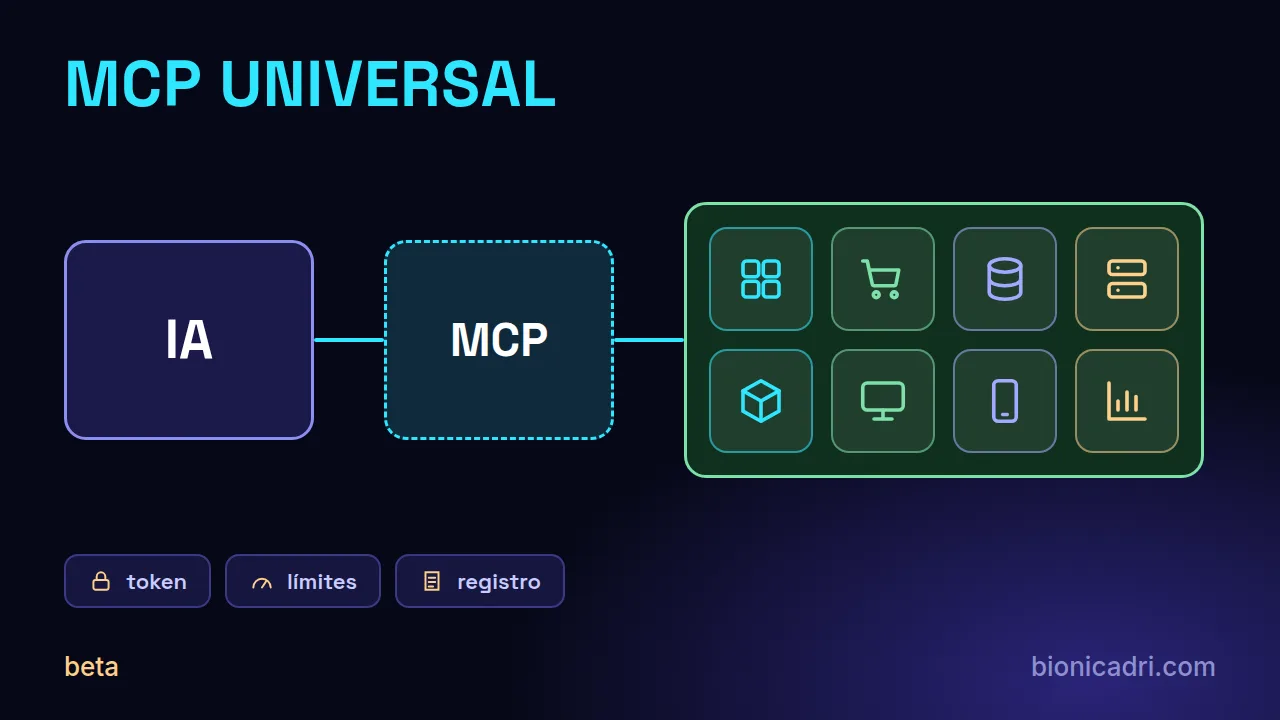
It is BionicAdri's tool that lets an AI — ADRI or another MCP-compatible assistant — query and work with your ERP, your online shop, your CRM, your databases, SAP, 3D design, your servers and even your desktop or mobile. All from a panel with tokens, limits and a log of what the AI does.
Status: beta. It can be used, but we are still testing it, and some parts, such as the three SAP integrations, are still in alpha. Start with a test system and minimal permissions.
What it is
MCP is a standard that lets an AI use other programs in a controlled way. MCP Universal is our service that acts as a bridge: you connect your ERP, your shop or your database, and the AI queries them when you ask it to, with the permissions you decide.
You don't need to know the protocol. In practice, you paste an address and a token, and carry on talking to the AI as usual.
No coding
For example: “Which orders does the shop have pending?”, “Are there any slow queries in the database?” or “How much stock is left for this item?”. The AI uses the relevant integration.
Data stays where it is
Integrations are live queries, not a copy of your data. Your ERP or database stays where it is.
Permissions
What the AI can do is set by the token you give it: from read-only to write access. You choose, integration by integration.
What it connects
Each card has two labels: how it connects and what status it has. Today, 39 go via MCP Universal, 8 via the connector you install on your computer and 2 (Universal Web and Xmart) have their own MCP.
5 integrations
Schema, tables and live data. For databases, we recommend read-only access; permissions are set by the token.
14 integrations
Sales, stock, invoices, customers and orders from the programs you already work with.
14 integrations
Your website, your hosting, your infrastructure and your repositories.
3 integrations
Boards, notes and the weather forecast.
5 integrations
Channels and notifications. With ADRI, before sending anything to third parties you are asked for confirmation.
8 integrations
3D and CAD design, desktop and Android phone, with the MCP Universal connector you install on your PC.
MCP Universal: connects with the address and token you get from the MCP Universal panel. On your computer: requires the MCP Universal connector, a program you install on your PC. Your own server: connects directly to your system, with its address and token.
Beta and alpha: all can be connected and all are in beta; Universal Web and Xmart are the most tested. We mark the three SAP ones as alpha because they have not yet been tested against a real SAP; in the application they appear as beta with the same notice. Third-party program names are trademarks of their owners and only indicate what MCP Universal works with.
Control
An AI with access to your systems must come with brakes. These are the ones MCP Universal provides from its panel.
Tokens
Each access has its own token. You can adjust what it can do, which tools it can use, from which addresses and until when, and revoke it if it leaks.
Limits
You set usage limits on each connection, so a failure or abuse does not get out of hand.
Log
What the AI has done with each connection is recorded. The panel stores your keys encrypted and supports two-factor authentication.
Permissions
For databases and SAP HANA, we recommend read-only access: the AI queries and analyses, but changes nothing. If a write fails because the token is read-only, that is the protection working.
With ADRI
With ADRI, before sending or publishing anything to third parties (Slack, Discord, Twilio, SendGrid, Zendesk or an SMS from your mobile), you are asked to confirm the recipient and the text.
Responsibility
Each person connects their own connection, and tokens are not shared. The first time, a legal notice is accepted and stored with date and time, because data leaves your system for the service you connect.
Two ways to use it
The fastest way
You use it in the BionicAdri service. You do not install any server: you create your connections and tokens from the panel. If you want to connect programs on your computer, you install only the connector on your PC.
On a quote basis
MCP Universal is installed on your own server, with a licence. It is the option for those who want to have the bridge inside their company. It is arranged on a quote basis.
What AI it works with
MCP Universal is not exclusive to ADRI, although it is already integrated with ADRI.
Integrated
In the ADRI chat you open Integrations, choose the card, paste the address and the token and the connection becomes active. From there you talk as usual and ADRI uses the integration when needed. For long tasks, ADRI clones itself up to 20 copies at a time.
MCP standard
The service publishes the standard MCP OAuth authorisation information, including client registration. An MCP-compatible assistant that supports remote servers with OAuth can connect, not just ADRI. The notices and confirmations described above are ADRI's.
For the technician
What whoever is connecting it needs, in a few lines.
mcpu_. For a compatible assistant, access is given via OAuth with the permissions read, write and delete./mcp and a token uw_; in Xmart, the MCP address of your instance and its agent token.hdbcli.# Servicio central de MCP Universal
https://mcp.bionicadri.com
# Metadatos OAuth estándar de MCP (públicos)
/.well-known/oauth-authorization-server
/.well-known/oauth-protected-resource
# Universal Web (su propio MCP)
https://tu-web.com/mcp token: uw_...
# Acceso por token en MCP Universal
token: mcpu_...How to get started
It can be used, but we are testing it. These steps protect you in the meantime.
Tell us what systems you use and we'll see which integrations fit and whether the central service or installing it in your company suits you.
Start with a copy or a test company, never with production. With SAP it is essential: it has not yet been tested against a real SAP.
Start with a read-only user. Review the log of what the AI does and widen permissions only when you feel comfortable.
Frequently asked questions
MCP is a standard that lets an AI use other programs in a controlled way. An MCP server is the door: the AI calls that door to query your ERP, your shop or your database, and the door decides what it lets it do. MCP Universal is BionicAdri's MCP server.
Yes. In practice you get an address and a token from the MCP Universal panel and paste them into the integration's card. You do not write code. For programs on your computer, such as AutoCAD or the desktop, you also install the MCP Universal connector on your PC.
There are three SAP integrations: Business One, S/4HANA and the HANA database, the latter read-only. All three are in alpha: they have not yet been tested against a real SAP. Connect them first to a test company or system, never to production, and with a user with minimal permissions.
Only what the token you give it allows. If the token is read-only, the AI queries and analyses, but does not change anything. With ADRI, before sending or publishing anything to third parties you are asked to confirm the recipient and the text.
No. ADRI is BionicAdri's AI and the one that comes with it best integrated, but the service publishes the standard MCP OAuth authorisation information. An MCP-compatible AI assistant that supports remote servers with OAuth can connect. The confirmations and notices we describe are ADRI's.
It goes by quote: we prepare it according to your integrations and the way you work. You can use it on our central service or installed at your company with a licence. Request a quote from the contact form.
Not quite. MCP Universal is in beta: you can use it, but we are still testing it. Universal Web and Xmart are the most tested integrations; the three SAP ones are still in alpha and the rest are in testing. Start with a test system and with minimal permissions.
Integrations are live queries, not a copy of your data. Even so, what the AI queries leaves your system for the service you connect: that is why the first time you accept a legal notice, and you are responsible for not sending personal or customer data without authorisation.
Keep reading
Beta access
No fixed price: we prepare it as a quote, depending on your integrations and whether you want it on our service or installed at your company.