
When you receive a sales email, the first thing you look at is who sends it. If it comes from “ventas@”, the usual thing is to delete it. If it comes from a named person, writing as a colleague in your sector would write, sometimes you read it. That difference, so simple, is the idea behind how we now organise BionicAdri's CRM.
The shared mailbox problem
Many CRMs send everything from a single account and at a single pace: the same sender for all salespeople, the same schedule, the same text with the name changed. It has three flaws.
- It sounds like a campaign. Anyone who receives a hundred identical emails from a single address recognises them instantly.
- A single sender carries everything. If that account sends too much, its reputation suffers and delivery stops for the whole team.
- Nobody takes responsibility. When the contact replies, the reply lands in a mailbox that belongs to no one in particular.
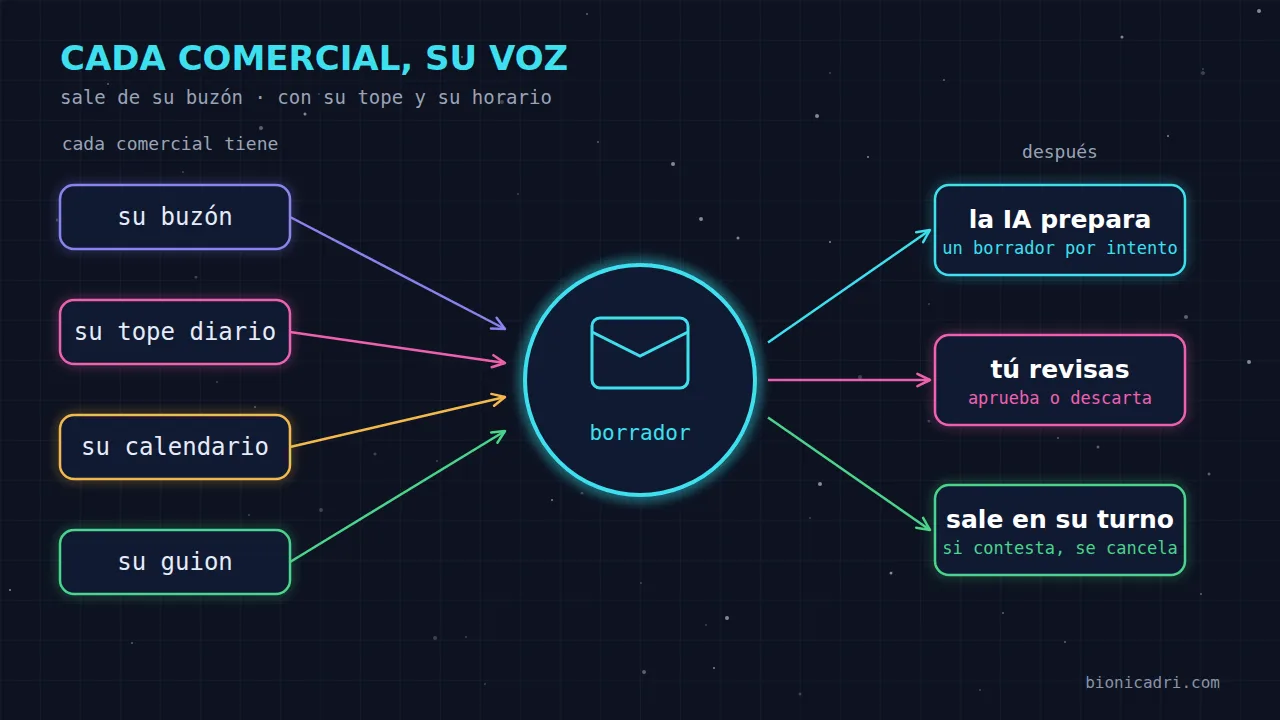
That is why, in the per-salesperson CRM, each person on the team works with their own.
What changes when each salesperson sends from their own account
Their mailbox. Messages are sent from each salesperson's personal email, with their name. It connects from the platform's own email, with Microsoft 365 or Google without giving the password, or with an app password. If someone does not yet have a mailbox connected, their message waits. Only if you decide so can that message go out through the company's general email.
Their daily cap. Each salesperson has their own, set by their manager, and only first contacts count. Follow-ups do not use up the cap. That way nobody eats into someone else's quota and each sender's volume stays under control.
Their calendar. Each person sends only within their working window: it respects their public holidays, their annual leave and their shift. The weekend is closed unless the salesperson has a shift or opens it manually. An email that arrives mid-afternoon on a Tuesday seems like it is from a person; one that arrives at three in the morning on a Sunday does not.
None of this is magic. It is what any well-organised sales team would do. The difference is that here the platform applies it for each person, without anyone having to remember.
One script, three attempts and the voice of each person
The company writes a general script: who you are, what you sell, how to research the contact and what is forbidden. Then there is a field for each attempt, up to three, that says what to do in the first, the second and the third, and through which channels: email, WhatsApp or LinkedIn.
Each salesperson can change only what they want. What they leave blank is inherited from the company script. And variables, such as their name, their role, the contact's company name or their city, are replaced before the AI reads anything. That way one script serves the whole team and each message is signed by whoever sends it.
The days you set pass between one attempt and the next. If the contact replies, the sequence stops. If not, after the last attempt and the period you have set, it moves to “Lost”, and you can decide whether to retry later.
Drafts: the AI prepares, the person decides
Here is the part that is most appreciated. ADRI does not write and fire off. It prepares each attempt once, can research the contact's website or professional profile beforehand, and leaves a draft with notes on why it wrote what it wrote. The draft waits its turn.
Each salesperson chooses how much they want to intervene. If they enable “review each draft myself”, everything ADRI prepares waits for their approval on the “Today” screen. From there they can edit, discard or approve one by one, or select several and approve them at once. We recommend doing this the first week, until you are confident in the tone.
Even if you don’t enable that option, there are situations in which the draft waits for a person: a gap left unfilled in the text, an email without a subject, a channel without data or a recipient who has unsubscribed. When in doubt, it does not go out.
A draft also expires. If the contact replies, changes status, unsubscribes, their email bounces or seven days pass without it being sent, that draft is no longer sent. And if the lead changes salesperson, the draft does not go out with the previous person’s signature: it is prepared again for the new one.
What the manager sees
The “Today” screen summarises the day in one sentence: how many first contacts go out today, how many replied yesterday and how many drafts are awaiting approval. Below, one row per salesperson with their progress against their cap and when their next turn is, and the replies from the last few days. Analytics by salesperson let you see who gets replies and with which attempt, without mixing up what the system does with what each person closes.
A salesperson sees only their own. The manager sees the whole team. And unowned leads are distributed among the salespeople with the fewest open leads; a lead is never taken away from someone who is active.
Before the first message: verified data
A good send starts before writing. ADRI first completes the company record and checks that the mailbox it is going to write to exists, not just that the domain responds. It discards domains that no longer exist, uses official sources from each company’s country and does not invent figures: if it cannot find a reliable data point, it leaves it blank. In addition, the platform only writes to business addresses, not personal email.
This reduces bounces, which are one of the things that most damage a sender’s reputation, and avoids absurd messages like “I saw that you turn over so many millions” with a made-up number.
Honest limitations
- A human email doesn’t guarantee a reply. What improves is the likelihood that the message arrives and gets read, not the contact’s interest.
- Before anything goes out, each salesperson accepts a legal notice. The sender is your company, and responsibility for the send rests with it. If you’re going to contact people in a new country, check with your legal adviser.
- If the person doesn’t review the drafts and lets them go out on their own, quality depends on the script. A vague script produces vague messages.
If you want to see the whole picture, it’s on the CRM with AI and WhatsApp page. In the article on the sales pipeline with ADRI we explain the full lifecycle of a contact, from acquisition to close. And to plan visits to those same customers, you have the customer map and visit plan.
Next step
Want to see how it would look with your sales team? Request a demo and we’ll show you ADRI preparing drafts with your own real data.
- CRM
- Sales
- Deliverability
- ADRI