
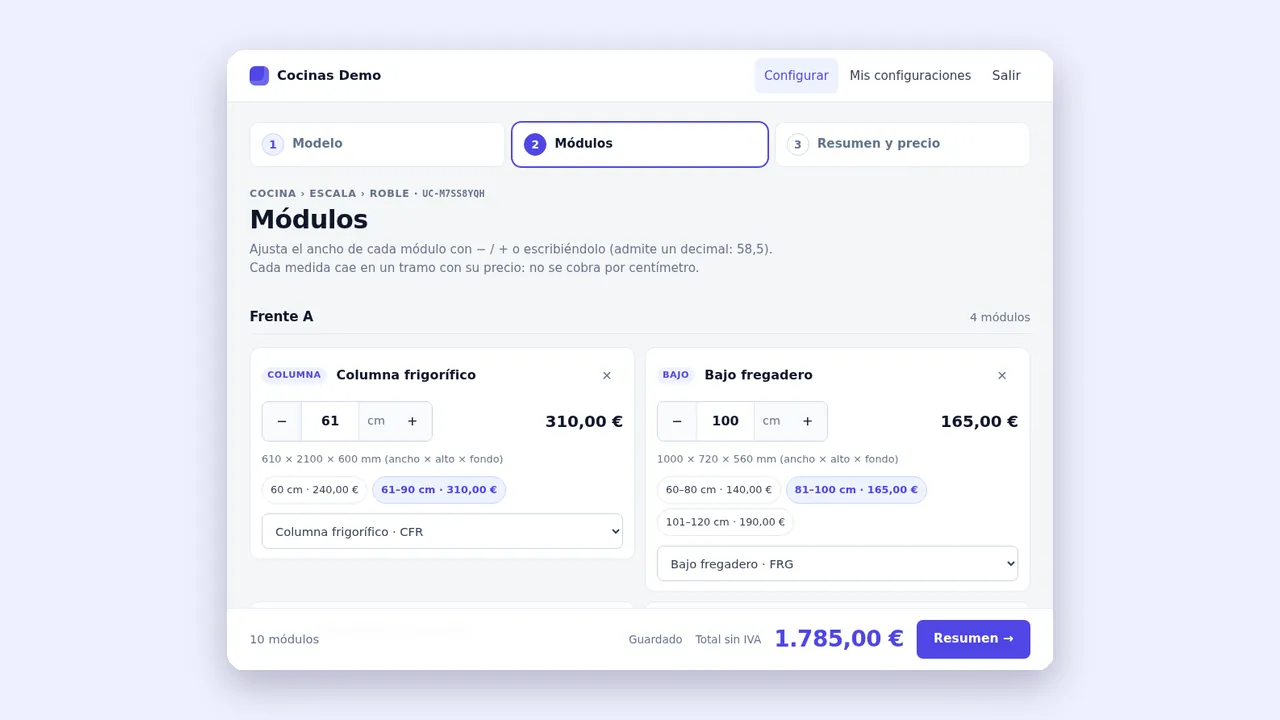
Universal Configurator is new and in its first versions (0.1.1). We say so from the start because we want you to try it calmly before putting it in front of your customers. The screenshots in this article use sample data.
What is Universal Configurator?
It is a catalogue-based product configurator for manufacturers and shops of kitchens, furniture and wardrobes. It is written in pure PHP, with no frameworks, stores the data in SQLite and comes with its own panel and its own MCP server. It is the sibling of Universal Web, the lightweight CMS from BionicAdri.
How a kitchen is configured
- The administrator loads the catalogue. A tree (for example kitchen, model, colour), the module types with their price table by measurement brackets, the default composition of each model, the real measurements and the formula-based cutting list.
- It is configured on the tablet. A salesperson, a customer or a guest, if you allow it, chooses the model, adjusts the width of each module, removes, replaces or adds modules and sees the total excluding VAT straight away.
- It is accepted and the price is frozen. If you later change the price list, what has been accepted doesn't change. The administrator can download the configurations in JSON and CSV.
Prices by bracket, not by centimetre
Every module type has a table of brackets: from this measurement to that measurement, one price. Width accepts one decimal place, so 58.5 cm is valid and falls in the 51 to 60 cm bracket. If a measurement falls between two brackets, the higher one is charged and the line explains it; if it falls outside the module's limits, it isn't valid and it tells you which brackets are available. VAT is shown separately.
The price is always calculated by the server, never by the tablet: you get the same result on the tablet, in the panel and when an AI reads it.
Formula-based cutting lists
Every module type carries its parts with formulas that use the width, the height, the depth and the thickness of the board and of the back panel. When the width changes, the parts are recalculated in millimetres, with their grain and their edges, and the cutting list groups identical parts together. When the configuration is accepted, the cutting list is frozen together with the price.
What ADRI does: read the measurements and produce the CAD drawings
The application doesn't draw drawings. That's what ADRI, BionicAdri's AI, does, connected via MCP: it reads and changes configurations with the exact measurements and, from the BionicAdri chat, draws the CAD drawings with those measurements (the floor plan, the elevations, the modules, the parts and the cutting). It also prepares the PDF and the follow-up.
- Clear permissions: with a read token it looks things up; with write access it creates and changes drafts.
- It acts as the person you choose: if that's a salesperson, it only sees that salesperson's configurations.
- It doesn't recalculate: your configurator calculates the price and the parts; ADRI reads them.
- Accepting is up to you: ADRI only accepts a configuration when you tell it to, after showing you the total.
In BionicAdri you connect it from Integrations, which is in beta. If you want to understand better how ADRI uses your programs, read MCP and connectors.
How to install it
On an Ubuntu or Debian VPS, with a single command: the installer sets up PHP-FPM and Caddy with automatic HTTPS. On any other server with PHP 8.2, you copy the folder and point the domain to the public/ folder; when you open the address, the installer checks the requirements and creates your admin account. No Composer, Docker or Node needed.
The licence, precisely
Universal Configurator is free for your own company, with the code in the open, under the BionicAdri Licence 2.0. You can install it, adapt it privately and let your salespeople, your customers and your distributors configure your products. But there are rules:
- You cannot resell it or offer it as a service to other companies.
- You cannot install or maintain it for others for money without a written licence from BionicAdri, which may be free: ask for it.
- You must keep the credit «Made with Universal Configurator · Powered by bionicadri.com».
- There is no warranty or support with the free licence. For any questions, email [email protected].
What it doesn't do yet
At the moment it doesn't include a 3D view, online payment, a direct connection to an ERP or import from Excel. The screens are in Spanish.
Who is it for?
For manufacturers and kitchen, made-to-measure furniture, wardrobe or carpentry shops that sell by modules and want to give the price in front of the customer. You'll find the details on the Universal Configurator page and the code on GitHub.
Frequently asked questions
Is Universal Configurator free?
Yes, for your own company. Reselling it, offering it as a service or installing it for others for a fee requires a written licence from BionicAdri.
Does it produce drawings?
No. The application calculates the price and the parts using exact measurements; the CAD drawings are produced by ADRI, or another AI connected via MCP, from those measurements.
Do I have to use ADRI?
No. The admin panel and the tablet work on their own. MCP is optional.
Is it finished?
It's new: it's at version 0.1.1. Try it with the sample data before using it with customers.
- Universal Configurator
- Product configurator
- MCP