
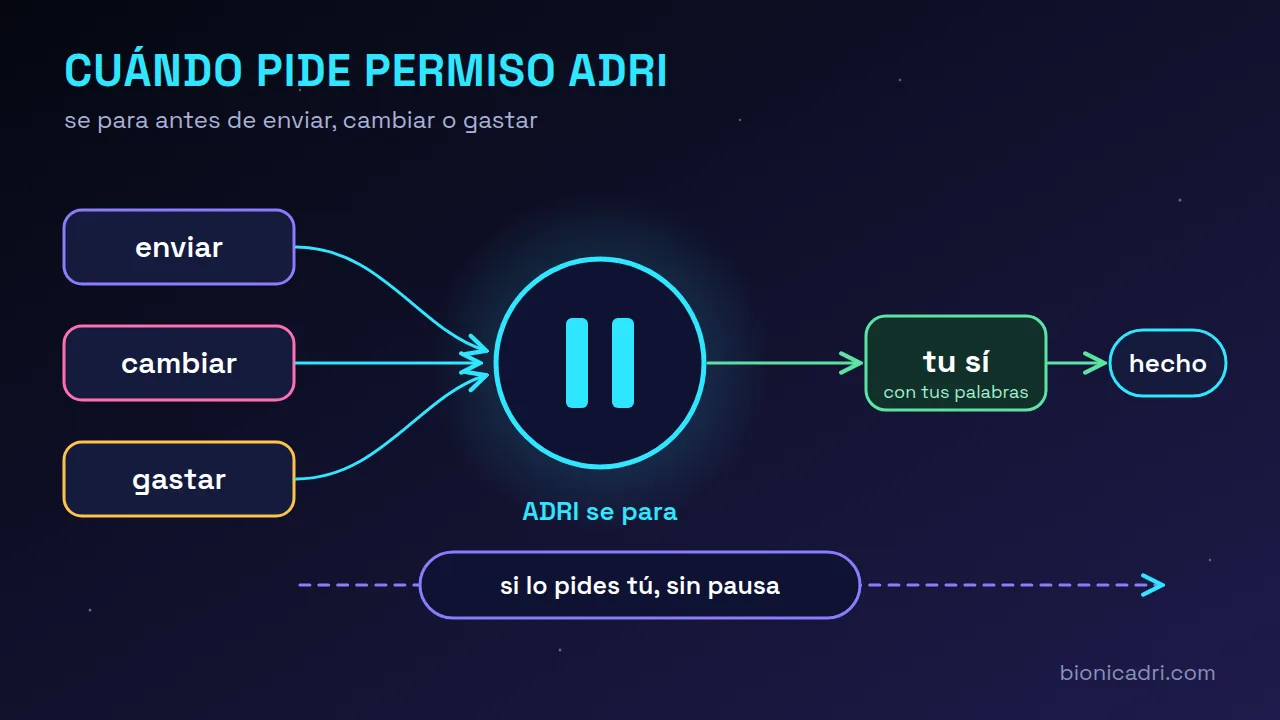
Behind this is an idea we already covered in who decides and who reviews in ADRI: the AI model supplies the intelligence, and the rules around it supply the judgement. The pause is one of those rules.
The pause ⏸️: what it is and what you read in it
When ADRI is about to do something with consequences outside the chat, such as writing to someone outside your company, changing a record or spending, it doesn’t do it yet. It puts up a pause ⏸️ and waits.
The pause is not a technical dump. It is written in plain language: “I am going to send an email to this contact with this subject”, followed by the exact text. It appears in the language you write in: Spanish, English, French, Portuguese, Italian, German, Catalan, Galician and Basque.
That sentence is not written by the AI: the program composes it from the actual action. This way, a model manipulated by someone else's text cannot describe one thing to you and do another.
To continue, reply naturally: “yes”, “go ahead”, “okay”. An answer with a condition or a doubt (“yes, but wait”, “only to Pedro”) does not count as a clear yes. If you do not answer, the pause expires after an hour and nothing is done.
When it doesn’t ask: what you have instructed
If you ask for something specific in your own message, your message is already the yes. “Send Pedro this email with this text” or “move meeting 442 to five o'clock” go through first time. For it to count, the instruction must name the target and must not include conditions or be a question. If it is a send, the recipient must also have been written by you or already be in your company's data.
Before doing it, ADRI leaves a note in the security log; without it, it does not bypass the pause. A background task you launched inherits the yes, but only for the recipients you wrote in your message: whatever ADRI decides on its own does not go out.
When it always asks, even if you have instructed it to
There are five cases in which the pause remains, whatever you ask:
- Money. Paying, collecting, marking an invoice as paid or marking a commission as paid.
- Many things at once. More than five records in the same turn.
- Third parties. Changes that notify or affect someone outside, such as an event with guests.
- What ADRI decides on its own, or what is suggested to it by an external text that appears to contain instructions. An email or a website cannot give it orders.
- Ambiguity. If your message does not make clear which object it acts on.
There are also actions that are never skipped: an active security audit, deleting the personal data of someone exercising their right to erasure, or importing invoices from another program. And if there is no person present, for example in an automated task, ADRI does not send anything to people outside: it leaves it pending until a person confirms it from the chat.
“From now on, don't ask me for permission”
If you prefer not to be asked, you can tell it on a lasting basis: “from now on, don't ask me for permission”, for everything or just for one area, such as emails. ADRI remembers it in subsequent tasks until you say “ask me for permission again”. It is recorded with your exact wording.
It is not activated by mistake. It requires the relevant permission, which your administrator assigns in Roles, and a second reviewer that reads only your message and requires you to mean it, in the present tense and without conditions. An ironic remark, an “if one day I tell you…”, or a phrase inside a forwarded email does not count.
And the safety limits remain in place. The preference does not skip the actions that are never skipped, nor anything that comes from suspicious text, nor mass sending unless your phrase names it. In security, a decision model can only tighten: add a pause, never remove it.
Mass sends and messages that arrive late
Sends to many people have a brake. If in one task ADRI is going to write to more than five people outside in an hour, it shows you the text and how many people it will go to, and only continues if you say yes. Splitting it into small batches does not get around the brake, because the recipients of the whole task are counted. If in the same message you ask for a specific group and expressly authorise it, it applies to what you asked for and no more.
The application also sets its own cap: without the mass notifications permission, no one can queue more than five different recipients in an hour. There is a second lock, a receipt signed by ADRI on each send, which comes switched off and is enabled server by server: ask for it if you want it on yours.
The other problem with sends is the opposite: going out late. A message that does not go out on time no longer goes out: it remains as “Expired”, with the reason, and is not deleted. A temporary password expires after 10 minutes, a WhatsApp or a Telegram after one working day, and an email after two working days, according to your company calendar. If a WhatsApp session was disconnected, when it comes back the backlog does not go out all at once.
A test mode to rehearse without risk
When we test new versions we use a test mode. With it switched on, ADRI notes what it would have done, whether a send, a call or a change, and replies “simulated” without doing it; queries keep working. It is our tool: in a real installation it does not switch itself on and you do not have to touch anything.
More about security and compliance and about the chat with ADRI, or request a demo.
Frequently asked questions
Can I remove the pauses entirely?
You can tell ADRI not to ask you for permission, for everything or for one area, if your role has that permission. Even so, the safety limits remain: mass sending without your explicit phrase, suspicious texts and the actions that are never skipped.
What happens if I do not answer a pause?
It expires after an hour and nothing is done. You can ask for it again whenever you want.
Can an email or a website give ADRI orders?
No. If ADRI reads outside text that appears to contain instructions, anything derived from it always asks for your approval and cannot be skipped even with a preference.
- Security
- Permissions
- ADRI
- Deliveries