
The problem every season
Agriculture, hospitality, logistics, tourism: many companies work seasonally and have permanent seasonal workers. At the start of each campaign, they have to call them one by one. If the call is made by phone or with a one-off message, it is then difficult to prove who received it, when they opened it and what they replied.
With BionicAdri, the call-up becomes a traceable process: each step is logged and no one can change it afterwards.
Where it is and who can see it
The screen is in HR Management → Call-ups. Only the HR role can see it (and the super administrator). Neither administrators nor managers have access, on purpose: it is sensitive employment information and it should be managed by the right people.
How it works, step by step
1. HR creates the campaign
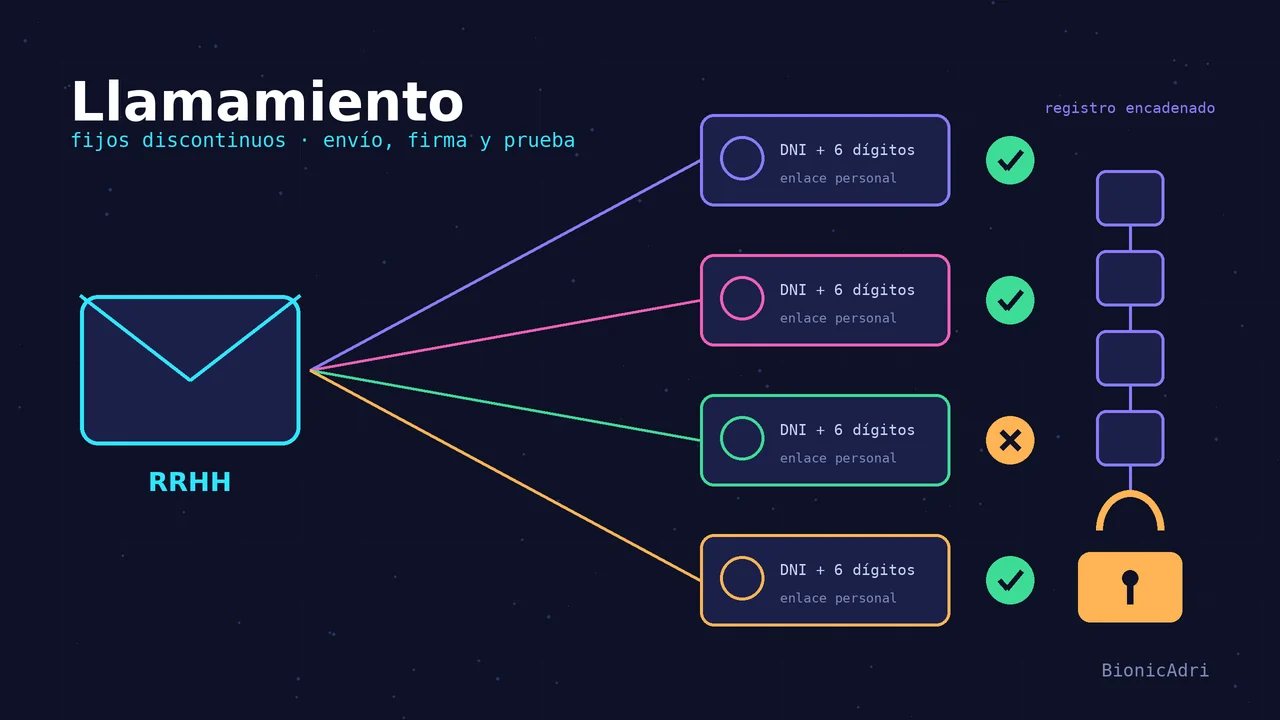
HR creates a call-up campaign and chooses who it is sent to. Each person receives their own personal link, by email. If they do not have email, it arrives by WhatsApp.
2. The person opens the link with two pieces of data
To open the call-up, the person enters their DNI or NIE and a 6-digit code. The code arrives by email; by WhatsApp only if the person does not have email or email fails.
This way, even if someone forwards the link or sees it over your shoulder, they cannot open it without both pieces of data. If something does not match (expired link, incorrect DNI, wrong code), the message is always the same: «Invalid or expired». No clue is given as to what went wrong.
3. Signs acceptance or rejects it
The person reads the call-up and signs acceptance or rejects it. There is an important detail: the link is used up when signing or rejecting, never when opening it. If someone opens the link, leaves it halfway and comes back later, they can still respond.
The proof: a record that cannot be rewritten
Everything that happens is logged: sending, opening, signature, rejection and expiry. That record has two properties:
- Append-only — entries can be added, but existing ones cannot be modified or deleted.
- Chained with fingerprints — each entry carries a fingerprint that depends on the previous one. If anyone tried to tamper with one, the chain would break and it would be visible.
In addition, the record protects personal data: the DNI, the link token and the code are never stored, neither in that record nor in the logs.
| Time | It's logged |
|---|---|
| HR sends the call-up | Sent |
| The person opens the link | Opening |
| The person signs | Signature of acceptance |
| The person rejects | Rejection |
| Deadline passes without response | Expiry |
Expiry and campaigns that are not deleted
Call-ups expire on their own: the system checks every 15 minutes, so nobody has to remember to close them. And a campaign already sent cannot be deleted, because it is proof. If later you need to demonstrate what was done, the campaign is still there.
If someone doesn't receive the code
It happens: a misspelled email, a full inbox. HR sees a warning, «The code isn't arriving…», next to that person, so they can act in time instead of finding out the day the campaign starts.
What ADRI does and doesn't do
ADRI does not intervene in the sending or the document. The sending, the code and the signature follow a fixed process, with no artificial intelligence involved. The only thing ADRI can do, if asked, is propose template drafts to write the call-up; the HR person reviews them and decides.
An example to picture it
Think of a fruit packing company that opens its campaign in October. The HR manager goes into Call-ups, creates the campaign, chooses the people to call and sends. That same afternoon she knows who hasn't received the code and can act, and each opening, signature or rejection is recorded in the log.
If the days pass and someone doesn't respond, the call-up expires on its own and that expiry is also recorded. When later someone asks what happened with that person, the answer is in the record, with its date and its fingerprint.
Why the proof matters so much
A call-up without proof is a conversation that only exists in the memory of the person who had it. With this process, the company can show that it sent the call-up, that the person opened it with their own details and that they responded, accepting or rejecting. The person, for their part, gets a clear and simple process, and doesn't depend on someone managing to reach them by phone.
And since the record doesn't allow deleting or changing what's noted, the proof doesn't depend on anyone's good faith, neither yours nor ours.
What you should have to hand
- Up-to-date contact details — a correct email for each person ensures the code arrives; the warning «The code isn't arriving…» helps you detect it.
- Each person's DNI or NIE — that's what they will type to open their link.
- The reviewed call-up text — if you ask ADRI for a template draft, always review it before sending.
- Your labour advisor's approval — on deadlines, form and conditions of your collective agreement.
Before you start
BionicAdri gives you the tool to send, collect the response and keep the proof. The conditions of the call-up (deadlines, form, order) depend on your collective agreement and your situation. This is not legal advice: consult them with your labour advisor.
If you want to see it working, request a demo or write to us at [email protected]. You can also see how the working day is recorded in the HR and time tracking guide.
- Fijos discontinuos
- Call-ups
- RRHH
- Electronic signature
- Proof of delivery