
Fields with rules
Text, numbers, dates, email, phone, DNI or CIF with the check letter verified, options and checkboxes. Up to 50 fields per form.
Forms
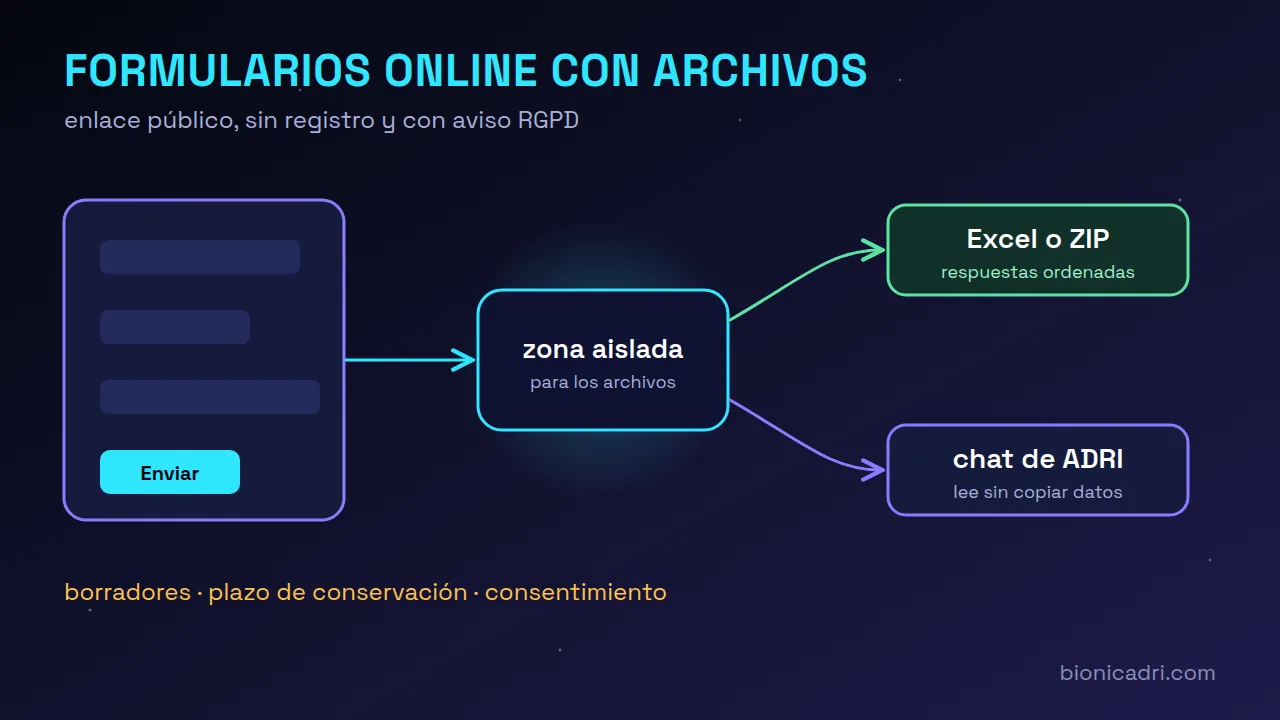
You create a form, share its link and anyone from outside — a customer, a supplier or a candidate — sends you their details and files without signing up. You receive the responses in order, export them to Excel or pass them on to ADRI.
What it is
A public form is a page with its own link where someone from outside sends you data and files. It flags errors straight away, so no one comes back to a half-filled form, and every response arrives in the same order.
It works for supplier onboarding, candidate documentation, customer details for a quote or registrations. We tell the full story in online forms with file uploads and GDPR.
What it does for you
Text, numbers, dates, email, phone, DNI or CIF with the check letter verified, options and checkboxes. Up to 50 fields per form.
PDF, images (including HEIC from iPhone), Word, Excel, LibreOffice, CSV and text, up to 20 MB each. Never ZIP, HTML or SVG.
Whoever fills it in doesn't create an account. They see your company logo, the fixed texts in their language and, on submitting, a reference number.
If you enable it, the person saves their progress, with their files, and comes back with a link. What is saved is encrypted and deleted after 180 days.
Export the responses to Excel straight away, or a ZIP with the Excel file and a folder of files per response, prepared in the background.
A button opens a conversation with ADRI about a response or a form. ADRI reads the form data, without copying it into the chat.
How it works
You enter the name, description, fields and data protection block.
You share it by email, WhatsApp or on your website. You turn it off or regenerate it whenever you want.
With a summary, filters and alerts for duplicate or incomplete responses, ready to export or review with ADRI.
Data and security
It is not published without a data controller, purpose, consent text and retention period. Each response records which version of the text the person consented to.
You set a maximum in days. After that period, responses and their files are deleted automatically every night.
To read their text, files are opened in an area with no internet or access to the rest of the server. If it cannot be isolated, they are not read.
Traps that a person won't notice and submission limits per connection, per form and per day.
Search for someone by email, phone or DNI across all forms, export their data or delete their response with a reason.
Each form has a log of who did what and when. It does not store response data or the IP address of the person filling it in.
Price
You pay per seat: a seat is an AI task running in parallel, not a person, so there is no limit on users. The server where your data lives is chosen separately, from €100/month. Prices excluding VAT.
Frequently asked questions
No. They open the link, fill it in, tick consent and submit. When they finish, they see a reference number.
Yes. Fields you remove are archived and their data stays in previous responses. What you cannot do is change the type of a field that has responses: you create another one.
Yes, text from PDF, Word, Excel and images with text, always in an isolated area and only from forms you can see. What the public wrote never gives it instructions.
By default, the super administrator, administrator and management; HR, office, sales and employees can be granted access to specific forms. The administrator can change this in Roles.
No. The module comes switched off and is turned on from the module marketplace. Each form starts with its public link switched off.
Keep reading
No-obligation demo
Tell us what data you request by email today and we'll show you how it would look as a form. No commitment.