
A supplier onboarding, a candidate's documentation, a client's details for a quote, a training registration. They all have the same thing in common: you need data and files from someone who doesn't work at your company. BionicAdri's public forms are designed for that.
How do I create an online form with file upload?
In Documents → Forms → New form you set the name, a description for the person filling it in and the thank-you message. Then you add the fields, up to 50 per form:
- Short and long text, numeric, email, phone and date, each with its own rules (minimum, maximum, decimals…).
- DNI, NIE, NIF or CIF with the check letter verified.
- Drop-down lists, multiple choice and yes/no checkboxes.
- Files: one or several per field, up to 10 and up to 20 MB each, of the type you choose.
PDF, images (including HEIC photos from iPhone), Word, Excel and LibreOffice documents and spreadsheets, CSV and text are accepted. ZIP, HTML and SVG are never accepted, even if you ask for them, because they are the formats most easily used to sneak in something harmful.
The person filling it in sees errors immediately, but the server has the final say: anything that doesn't meet the rules isn't saved.
What does the person filling it in see?
A page with your company's logo and name, the description, the fields and the data protection notice. No registration required. Buttons and notices appear in their language. If something is missing, they are told which field to correct without losing what they wrote. When they finish they see your thank-you message and a reference number.
There is one link per form and it carries a long key that can't be guessed. You turn it on and off whenever you want. If it has been shared more widely than intended, you regenerate it and the previous one stops working.
Continue later, without losing files
Some forms can't be filled in in one sitting: a certificate is missing, a number has to be looked up. If you enable Allow continue later, the person saves what they have so far, including files already uploaded, and receives a link to come back. If they enter their email, that link is also sent to them, and the email is not saved with the draft.
What is saved is encrypted. Drafts don't appear in your responses or exports, and they are deleted automatically 180 days after the last save. The person themselves can delete what they saved whenever they want.
What does the GDPR require of a web form?
To be able to publish a form you have to fill in the Data protection block:
- Data controller and contact for exercising rights.
- Purpose: what you are going to use the data for.
- Consent text, with a link to your privacy policy if you want. The person filling it in has to tick the box, and each response records which version of the text they consented to.
- Retention period in days. It is a maximum: once that period has passed, the responses and their files are deleted automatically every night.
The public page always shows the full notice; it can't be removed. And if someone asks for their data or asks you to delete it, whoever manages the forms can search for them by email, phone or DNI across all forms, export their data or delete their response with a reason.
This text is for guidance only: the legal basis and the specific retention periods for your processing are decided by your company, with its adviser if needed.
Files from unknown senders that are never opened without isolation
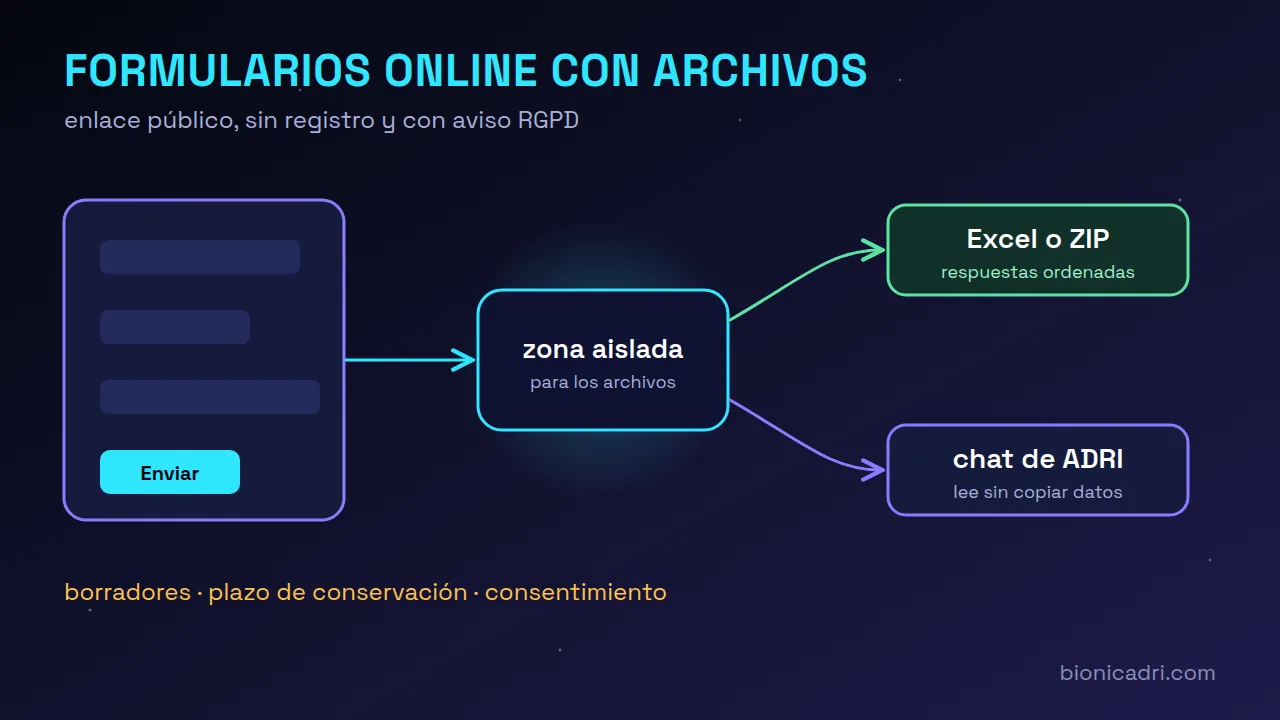
A public form receives files from anyone. That is why they are never published or opened on the server without protection. When their text needs to be read, the programme that opens them works in an isolated environment: without internet, without seeing the internal network or the server keys or the rest of the company's files, and with time and memory limits. If that environment cannot be created, the file is not read. You download them from the application; they are never opened on screen.
In addition, the page has bot traps that a person does not notice and submission limits per connection, per form and per day.
Sorted responses and export to Excel or ZIP
In Responses you see a summary (totals, responses per option, minimum, maximum and average of the numbers), filters by date and by any field, and useful alerts: new responses, possible duplicates by the same email or DNI, empty required fields or responses that will be deleted under the time limit in 7 days.
- Export to Excel: one row per response and one column per field, instantly.
- Export ZIP with files: the Excel plus a folder per response with its files. It is prepared in the background, you are notified when it is ready and it is deleted from the server after 7 days.
Send responses to ADRI chat
The Send to chat button opens a conversation with ADRI that is already written, for example “read response 123 and tell me what it contains”. Data is not copied into the chat: ADRI reads it from the form when needed, including the text of uploaded PDF, Word or Excel files. It only sees the forms you can see, and every read is logged under your name.
What the public wrote never gives ADRI orders: it treats it as third-party information. And there are per-task limits so no one can make it dump an entire form.
Who can create and view forms?
By default, the super-administrator, administrator and management create and manage forms; HR, office, sales and employees can be given access to specific forms. The administrator can change this in Roles. The module is off by default and is turned on from the module marketplace.
More on online forms, on candidate selection and CVs and on security and compliance, or request a demo.
Frequently asked questions
Does the person filling it in need to register?
No. They open the form link, fill it in, tick consent and submit it. When they finish, they see a reference number.
What files can be uploaded?
PDF, images (including HEIC from iPhone), Word, Excel and LibreOffice documents and spreadsheets, CSV and text, up to 20 MB each and 10 per field. Never ZIP, HTML or SVG.
How long are responses kept?
The period you set for each form, which is a maximum. After that period, the responses and their files are deleted automatically.
Can ADRI read uploaded files?
Yes, text from PDF, Word, Excel and images with text, always in an isolated environment and only if you can see that form.
- Forms
- RGPD
- Documents
- ADRI