
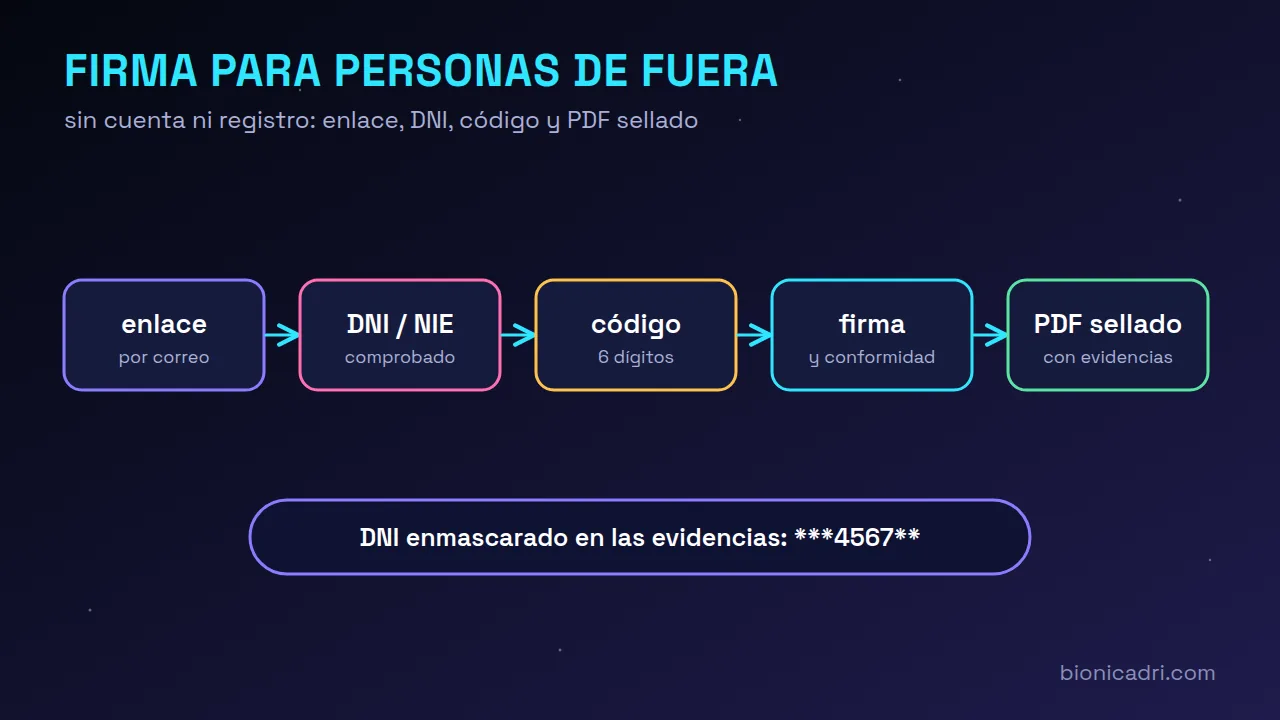
Signing with someone outside your organisation usually ends in one of two ways: either you print it, they sign, scan it and send it back blurry; or you ask them to sign up to a platform they don’t know. Both get stuck. What works is for the person to open a link, prove that it is them and sign. And for you to be left with proof that stands up.
Can a document be signed without registering?
Yes. In BionicAdri, in Documents → Send for signature, you add the external recipient with their name and email. No user is created for them: they sign from a link.
If you want, you also enter their DNI or NIE. If you include it, the person will have to enter that same number to get in. If you do not include it, they will enter their own when signing and it will be recorded as declared, that is, not verified. The evidence page says which of the two cases applied.
What the person who receives the link does
- They receive an email from your company with the button “View and sign the document”.
- They open the link and see who is sending them the document and what it is.
- They enter their DNI, NIE or passport.
- They receive a 6-digit code in the same email and enter it.
- They read the full document, tick that they agree and press Sign. They can also reject it with a reason.
- A signed and sealed copy arrives by email as their proof of signature.
Drawing the signature with your finger is optional. The signature is valid because of the code, which only arrived in their email, together with the DNI or NIE. The stroke is a visual complement.
The link is not used up when opened. It is valid until the end of the day of the document's deadline or, if it has no deadline, for 30 days. If someone makes too many attempts with the DNI or the code, the link is blocked, you get a notification, and only Resend link generates a new one.
What remains as proof of the signature?
When everyone has signed, the PDF includes an evidence page: who signed, when, from which IP and the fingerprint of the original document. The signature is not painted onto the document; it is added at the end.
On that page the DNI or NIE does not appear in full. It appears masked, with only four digits visible, following the Spanish Data Protection Agency's criteria. That is enough to identify the person without exposing their document to anyone who sees the PDF.
The PDF is then sealed so that any later change can be detected. If your company has uploaded its digital certificate, it is sealed with that. If not, a temporary seal from the installation itself is used, which detects changes even though it does not identify the company to third parties. The signature is never lost because of a problem with the seal.
It is a simple electronic signature with strong evidence, not a qualified signature. For a particularly sensitive contract, check with your adviser whether you need a qualified provider.
What you see in the meantime
In the document record, each external person appears with the External label and their status. You can see if they’re locked out due to attempts, if the invitation isn’t reaching them or if the code isn’t reaching them, and you can resend the link or cancel the document. If you cancel it, they’re told they no longer have to do anything.
Payslips: confirm that it’s you every 30 minutes
The other side of signing is the data that not everyone should see. A payslip says how much a person earns. That’s why, even if you’ve signed in, to view, preview or download a payslip the app asks you to “Confirm that it’s you”.
- A 6-digit code is sent to your email, or via WhatsApp if you don’t have email. An authenticator app, fingerprint or security key also work.
- For 30 minutes, in that browser, you aren’t asked again. At the top you see “Unlocked until HH:MM” and a Lock now button in case you get up from your desk.
- It applies to all roles: the employee with their payslip and HR with everyone else’s.
- The same protection covers documents signed by other people, an employee’s file and the salary register.
Why isn’t the session enough? Because a session left open on a shared computer, or stolen, shouldn’t be enough to see what the whole staff earns. The code goes to your email or phone; the DNI doesn’t work as a key, because many people know it.
Signing your payslip doesn’t make you repeat it either: if you verified yourself 15 minutes ago or less, you just mark your confirmation. And ADRI only gives payslip amounts to those who can see them and have active verification; without it, it tells you the period and status, but not the figures.
Everything is logged
Every code requested, every verification, every lock and every payslip or document belonging to someone else that is opened are recorded in the access log, along with the IP, device and browser. GPS location is not recorded: the strong proof is already the code that only reached that person.
More detail in payslips with digital signature and in security and compliance. If what you’re signing are sales offers, see offers that the client signs online, or request a demo.
Frequently asked questions
Does the person signing need an account?
No. They receive a link by email, enter their DNI, NIE or passport and a 6-digit code sent to that email, and sign. No user account is created for them.
Do they have to draw their signature?
It isn’t mandatory. The signature is valid with the verification code; the stroke is a visual addition that, if drawn, is saved on the evidence page.
Why does it ask me for a code to view my payslip if I’ve already signed in?
Because a payslip is highly sensitive data. The verification lasts 30 minutes in that browser and prevents anyone with your session open from seeing it.
Is the full DNI visible in the signed PDF?
No. On the evidence page it appears masked, with only four digits visible.
- Signature
- Documents
- Payslips
- Security