
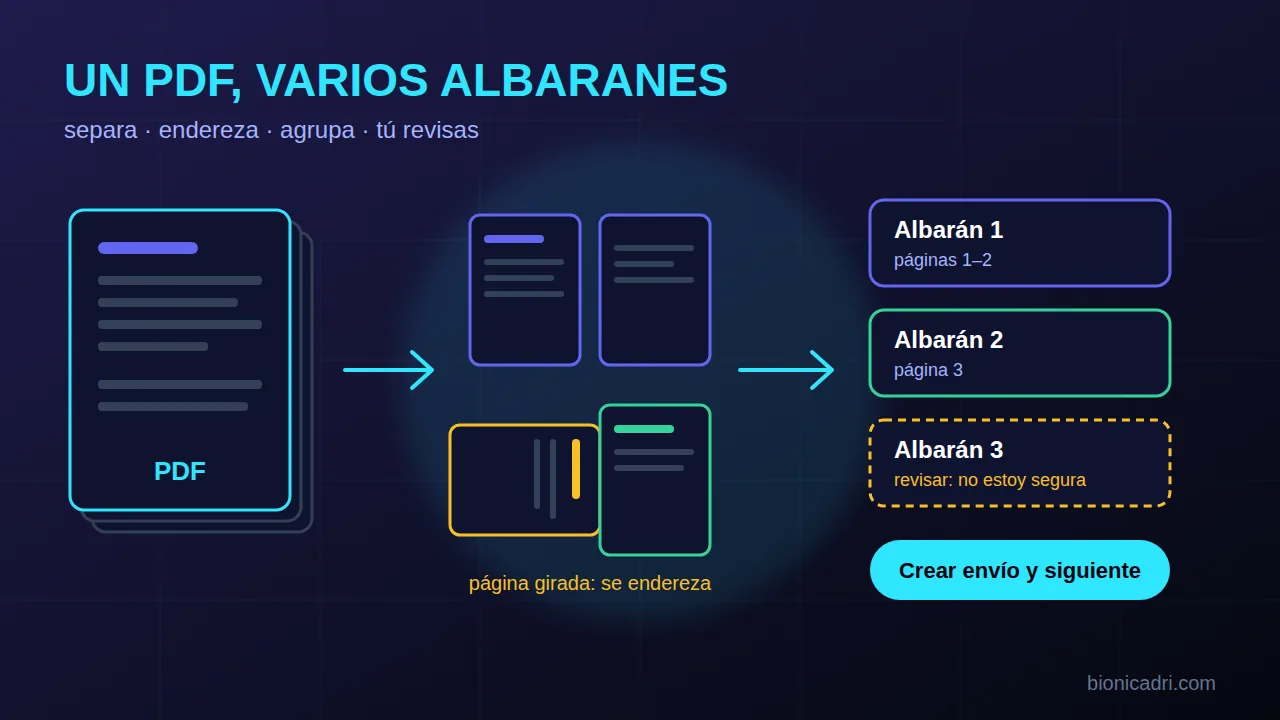
Many transport companies receive from their customers a single scanned PDF with four, five or more delivery notes. Until now, each delivery note meant cropping, taking a screenshot or retyping the data. Now you upload the whole PDF and ADRI separates it for you.
It works in the Palletways pallet transport network module. Here we explain how, and where you still need to check yourself.
You upload the PDF and ADRI separates it
The PDF is uploaded in the same place where you used to upload a single delivery note. If it is one page or a photo, everything works as usual. If it has several pages, ADRI looks at each page and decides what it is: the start of a delivery note, the continuation of the previous one, a delivery sheet that comes with the delivery note that follows or a load list (a summary of several delivery notes that is not a shipment itself).
Scans often come in with the wrong orientation. Pages scanned sideways straighten themselves. To decide which way to rotate them, the system prefers the direction in which the text reads best, and it does not simply accept an upside-down rotation. The process continues on the server even if you close the window, so you can come back later.
How it groups the pages
A delivery note can span two sheets. ADRI joins them using two clues. The first is sequential numbering: if one page says 1 of 2 and the next says 2 of 2, they go together, even if the delivery note number has been read incorrectly on one of them. The second is the delivery note number: when it matches, it takes precedence over the 'page 1 of 4' that the scanner sometimes prints.
You review them, one by one
ADRI proposes; it does not create anything on its own. You see the pages as thumbnails and how they have been grouped. Between two pages you can click to join or separate them. An amber group is one that ADRI is not sure about, and the load list is marked so that it is not read as a delivery note (if it is one, you indicate this).
Then you go through the shipments one by one. On the left, the delivery note page, which you can enlarge. On the right, the usual form, already filled in and with the same phone and town checks as a single delivery note. With 'Create shipment and next', that shipment is created and you move on to the next one. With 'Skip this one', it is saved as a draft for later.
The system also checks that a delivery note from the same batch is not repeated: one that has already been created cannot be created again, and the usual duplicate warnings still work.
If you are interrupted halfway through
If you close halfway through, when you return to 'New shipment' you will see a notice: 'You have a PDF with several delivery notes in progress'. You click Continue and carry on where you left off. What you had already created stays created.
An external PDF opens in an isolated area
A PDF that a customer sends you is a file you do not control. That is why everything that opens it (separating pages, converting them into images, reading its text, cropping it) is done in an isolated environment, with no network and no access to the application's data. We explain this in more depth in security and compliance.
Limits
- A PDF supports up to 20 MB, 40 pages and 20 delivery notes.
- For a delivery note with more than two pages, the first two are read.
- Two delivery notes on the same page look like one.
- ADRI is an AI and can make mistakes when reading a bad scan: that is why there is a review step before creating each shipment.
It is available for transport companies that work with that network, and it is activated on request. If you work with your own rates, see also the AI transport rates, and to see how ADRI reads other documents, plan and document analysis.
Frequently asked questions
Do I have to crop the PDF before uploading it?
No. You upload it whole, in the same place as a single delivery note. ADRI separates the pages and groups them into delivery notes, and you check the result.
Does ADRI create shipments without me seeing them?
No. Each shipment is reviewed one by one and is only created when you click «Create shipment and next». Those you skip remain as drafts.
What happens with pages scanned upside down or sideways?
Pages that are sideways are straightened automatically. If a page comes out wrong, you see it as a thumbnail and correct it before creating the shipment.
- Transport
- Delivery notes
- Documents
- ADRI