
Today, in almost any management software, to do something you first have to know where it is: which menu, which tab, which button, which filter. Whoever uses it eight hours a day learns it. The rest of the team wastes time searching, or asks someone else to do it.
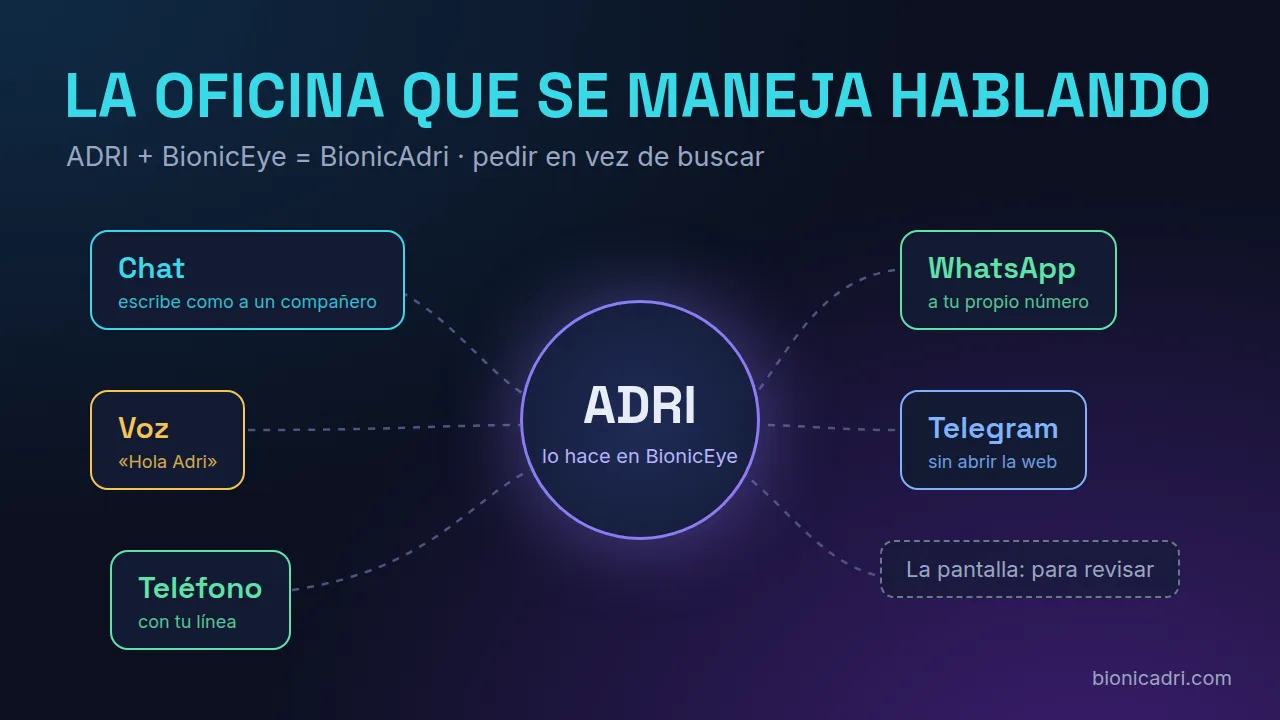
BionicAdri is two pieces that work together: BionicEye, the platform where your company's data lives, and ADRI, the AI that works in it. ADRI + BionicEye = BionicAdri. Our idea is to take that union to another level: making asking the norm, rather than searching.
I’ve lived it myself: from Notepad to VS Code, and from VS Code to talking
I’ve been programming for years and my story is that of many: Notepad → Notepad++ → other editors → VS Code → talking.
I started with Notepad, moved on to Notepad++, tried other editors and ended up in VS Code, like many people. Each change made me faster, but I always worked the same way: in front of the screen, learning menus, tabs and shortcuts.
Today I hardly open the editor. I work with an AI assistant for coding: I tell it what I want, often by voice and from my phone, and it does it. I review, look, ask and decide. The screen hasn’t disappeared from my day: I use it to check what has been done, not to do it.
If it has happened to me, and I live inside an editor, it will happen to whoever handles invoicing at a workshop or shift schedules in a warehouse. That’s what we want for BionicAdri.
The idea in one sentence
You tell ADRI what you need, through whichever channel you have to hand, and she does it in BionicEye with your permissions. The screen stops being the place where you work and becomes the place where you check.
What you can already do today
We're not starting from scratch. This already works in every installation:
- Chat. You write as you would say it to a colleague: “which customers haven't paid this month?”, “note on Acme that they called to ask for a quote”, “upload this receipt as an expense”. ADRI works with the data your role can see, not one bit more. More in Chat with AI: ADRI.
- Voice inside the chat. Voice notes and a hands-free conversation mode: you say “Hello Adri”, speak and she answers with voice. To hang up, just say “goodbye”.
- WhatsApp and Telegram. You message your own number and talk to ADRI without opening the website. There you can, for example, clock in or ask her for a figure.
- Phone. ADRI calls using your company line: to you, to tell you something, or to a customer, to ask them what you've asked her to. When she hangs up she leaves you the summary in the chat. More in ADRI's Phone.
- No forms for everyday things. “Clock me in”, “book me holiday from 2 to 6 December”, “this receipt is already paid”. ADRI does it the same way as the screen, with the same rules and the same log.
Where we're heading
This is what we are designing for upcoming versions. They are product ideas, not promises with a date: we release them when they work well, as always.
1. The screen comes to you
Today you go looking for the screen. Tomorrow it will be the other way round: when you need to see something, ADRI shows it to you. You ask “show me how collections are going” and the chart appears, with what matters marked out. You say “I want to see next week's rota” and she opens it on your mobile, ready to move a shift with your finger. These are views made for that moment, which close when you're done. No menus to learn: the screen becomes an answer.
2. Call the office and ADRI answers
Today ADRI makes calls, but she doesn't receive them. We want you to be able to call your company's number from the car and talk to her as you would with someone in the office: “has Transportes López paid yet?”, “move tomorrow's meeting to five”, “send them the quote we did yesterday”. And, if you decide so, for her to also look after your customers out of hours, with what your company has taught her.
3. One single thread, whether you switch channel or not
You start something talking in the car, carry on with it on WhatsApp at the site and finish it on the office computer. ADRI knows it's the same conversation and doesn't ask you twice. What matters is the task, not the channel you asked through.
4. ADRI takes the first step
Today you open the program to see what's there. We want ADRI to be the one that tells you what matters, on the channel you choose: “Good morning. There are three overdue invoices, shall I chase all three?” You answer “yes, except Martínez's, he already called me”, and that's it. Your job becomes deciding; the rest is prepared for you.
5. Each person, their own way of working
The sales rep on the road, by voice. The warehouse manager, on WhatsApp, with a photo of the delivery note. Admin, in the desktop chat. Management, with a spoken summary first thing. The same company, the same data and the same rules, but each person works the way that suits them best, without anyone having to learn thirty screens.
What screens will still be for
We don't think screens will disappear completely. We think their role changes: from a place where you work to a place where you review. Some things are easier to understand when you see them:
- A shift rota, a floor plan or a sales chart: at a glance you see what would take a minute to hear in words.
- Checking before signing or sending: an invoice, a payslip, a quote.
- Knowing what ADRI did, when and on whose behalf.
- When you can't talk: in an open office, in a meeting or somewhere noisy.
That's why we're not going to remove screens. What changes is that you won't need to go through them to get things done.
What doesn't change
- ADRI sees and does exactly what your role can see and do on the platform. If you don't have permission for something, it tells you and doesn't make it up. More in An AI in the company that only sees what you can see.
- Anything delicate, like cancelling an expense that's already approved or rejecting holiday leave, it confirms with you before doing it.
- Everything is logged as if you had done it on screen, and it shows that it came from ADRI.
- When ADRI calls someone, it says at the start that it's an AI.
- Your data stays on our own servers in Europe.
How to get started
If you already use BionicAdri, try it today: ask ADRI for something you usually do on screen, by chat or by voice, and see how long it takes. If you don't use it yet, request a demo and we'll show you with your company's data. And if you have an idea of how you'd like to talk to your office, write to us: the next versions are also designed with what you tell us.
Frequently asked questions
Are you going to remove BionicAdri's screens?
No. They all stay. The idea is that you shouldn't need to go through them for day-to-day work, and that they remain for reviewing, comparing and checking what ADRI did.
Can I call ADRI on the phone today?
Not yet: today ADRI makes calls, but doesn't receive them. You can already talk to it by voice in the chat and message it on WhatsApp or Telegram. Receiving calls is one of the ideas we're working on.
What if ADRI misunderstands me?
It works with your permissions, and anything delicate it confirms with you before doing it. On top of that, everything is logged, so you can always see what it did and correct it.
- Vision
- ADRI
- Voice and WhatsApp