
Reconciliation against the book
You give it your programme's control total and ADRI compares it with what it is going to import. If they do not match, it does not save. You check the figure against your programme before confirming.
Migration
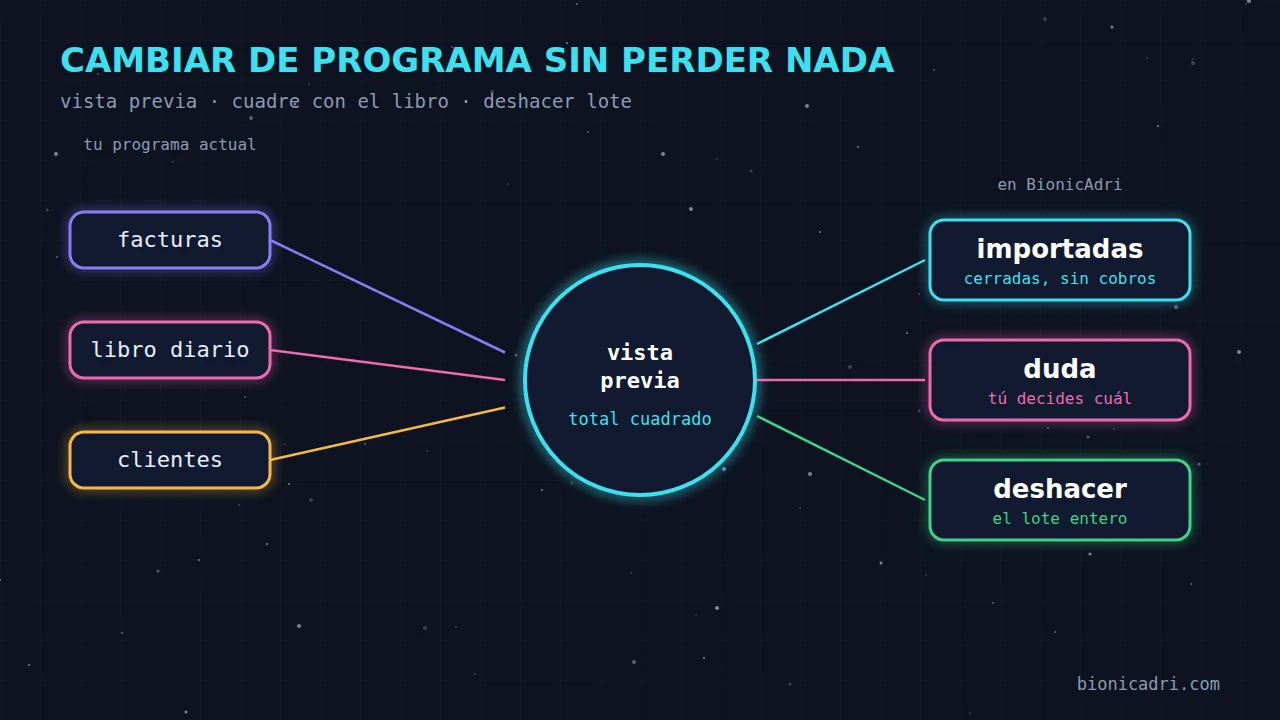
Give ADRI the invoices ledger, the journal and the customer list from your current software, for example Sage, Holded, A3 or Odoo. It shows you a preview, asks you about anything unclear and only saves when you say yes. If you make a mistake, you undo the whole batch.
What it is
There's no import wizard to learn. You tell ADRI "import the January invoices" and give it the file you exported from your software.
ADRI converts the file with code, not by copying rows by hand. That way none are missed.
Origins we cover: Sage, Holded, Odoo, A3, Contasol or other. If your software isn't on the list, it counts as "other". What we need is the exported file, not a connection to the software.
How it works
You export the book from your programme as Excel or CSV and send it in the chat, saying which period it covers.
How many invoices and credit notes, new customers and rows with errors. And the imported total, next to the total in the original book.
If something matches two invoices, ADRI asks you which one. It never chooses itself.
Only then does it save. If the total does not match the book or there are rows with errors, it will not let you confirm.
Control
You give it your programme's control total and ADRI compares it with what it is going to import. If they do not match, it does not save. You check the figure against your programme before confirming.
Anything that cannot be imported appears with its row and reason. Nothing is lost silently.
Re-importing the same file does not duplicate. If you invoice with both programmes at the same time, an invoice that is already in BionicAdri is recognised by number or by customer, date and total, and is skipped. The preview tells you how many.
The preview is valid for one hour. If the file changes between the preview and confirmation, ADRI asks you to repeat it.
Importing invoices requires permission to create invoices; importing the journal, permission to edit invoices; importing customers, permission to create customers. You adjust them in Roles.
Each import is recorded with who made it, when, and how many records it created or updated. That is what makes it possible to undo it.
Imported invoices
How to recognise them: they carry the “Imported” label with the programme name and a number starting with EXT, so they do not use up or skip the numbers in your series. The original number appears on the record.
Payments
Each invoice is included in sales, but not as pending payment, because we don't yet know whether it was paid.
ADRI links each payment to its invoice: first if the description quotes the number, then by exact amount and, failing that, starting with the customer's oldest invoice.
If a payment matches two invoices or quotes a number that is not from any imported invoice, it asks you or suggests one. The decision is yours.
Paid, partially paid, pending or overdue. Repeating the same journal does not duplicate payments.
Moving the debt to bills is not yet a payment. Payment happens when the bank collects the bill, and it is recorded against the invoice it referenced, with that date.
It is calculated from the invoice date using the customer's payment term: theirs or the company's, 30 days by default and never more than 60.
While a customer has imported invoices with an unknown payment status, they can't be deactivated. Import the journal ledger first to find out whether they owe anything.
Undo
«Adri, undo yesterday's import». It deletes the invoices that batch created, or the payments if it was a journal ledger.
It can be undone by whoever did it or by a general administrator.
The customers the import created are kept; they're data from your portfolio, not from the invoice batch.
After importing
With the journal to hand, ADRI answers accounting questions with your own figures and your own permissions.
ADRI only reads the journal: it doesn't create or change accounting entries. Imported invoices have no accounting entries in BionicAdri, because they were posted in your previous software; ADRI tells you how many there are in each period.
Natural next step: with your history inside, invoice from here. Take a look at invoicing with VeriFactu and quotes and contracts.
Price
Importing is part of what ADRI does for you, with the AI included in the platform. You pay per seat, one AI task running in parallel, not a person.
See all pricesFrequently asked questions
Sage, Holded, Odoo, A3 and Contasol are recognised by name; anything else comes in as «other». What ADRI needs is the ledger exported in Excel or CSV, not PDF.
Yes, though for a different purpose: it's used to know what has been collected. ADRI uses each payment to set the invoice as paid, part-paid, pending or overdue. Without the journal, invoices are left with an unknown payment status.
It won't let you confirm. The preview puts the imported total next to the one in the original ledger so you can check it against your software. The same happens if there are rows with errors.
No, not even as an administrator. You correct it in the source software and it arrives with the next import. That's what keeps the history faithful to what you issued.
Never. They don't go through VeriFactu, they aren't sent, they aren't charged to a card, they don't carry reminders and they don't move stock. They count in your figures, and that's it.
You say «undo the import» and that whole batch is deleted. The new customers it created are kept.
Yes. It tells you how many are created, how many are updated and the errors row by row. Re-importing the same file doesn't duplicate anything. Fields marked as sensitive are never imported by ADRI.
No-obligation demo
We show you an import with a real preview, in about 15 minutes.