
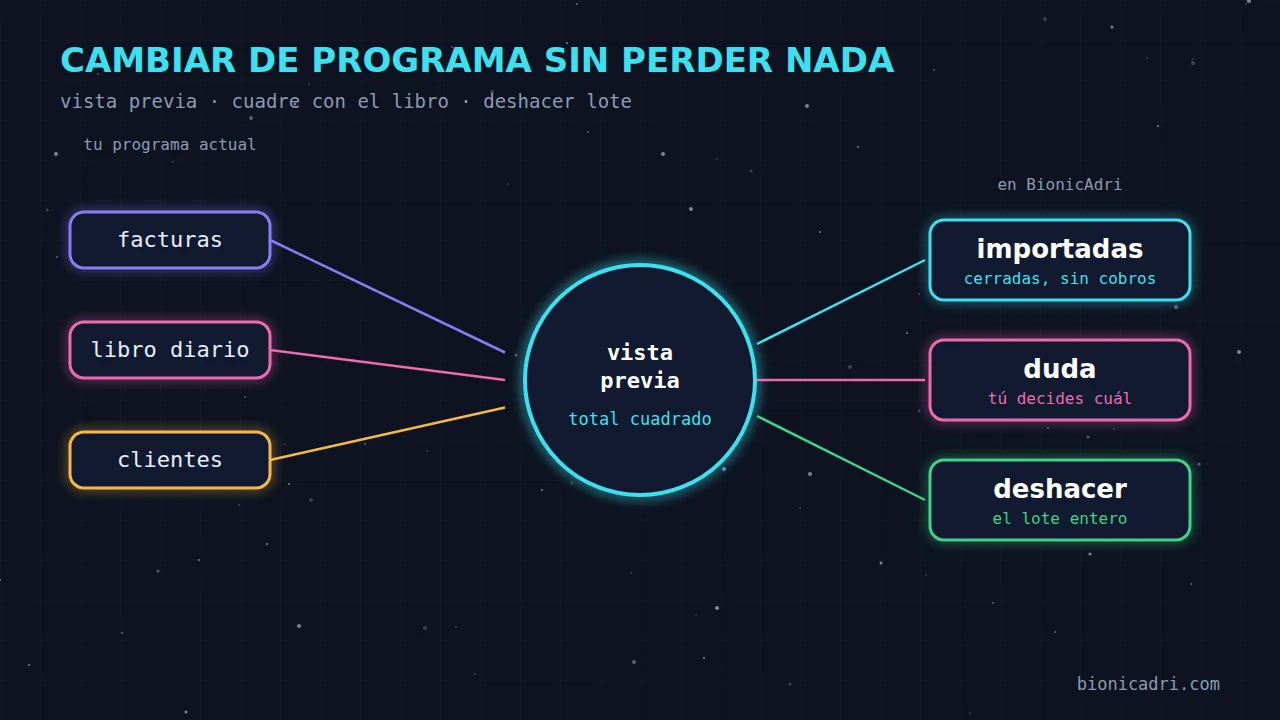
There are businesses that have spent years with a program they no longer like. It's slow, it doesn't talk to anything, every change costs money. And they stay with it. Not out of affection, but because changing is scary. It's a reasonable fear: in accounting, a mistake doesn't show up the day you make it, it shows up when the quarter comes round.
Let's put a name to that fear and see what it takes to take it away.
The same three fears as always
- Losing your history. Years of invoices, customers and payments that you don't want to type in again or leave sitting in a drawer.
- Throwing the VAT out of balance. The imported figures don't add up to the same as what was issued, and you find out when you file the return.
- The balances. Customers who owe money and who, after the switch, show up as if they owed nothing. Or the other way round.
All three have the same root: importing a file and trusting it. If you can't see what's going to come in, you can't reconcile it against anything and you can't go back, then any migration is a gamble.
First: nothing is saved without a preview
In BionicAdri there is no import screen. You pass ADRI the file you exported from your software and tell it what it is: the issued invoices ledger for a period, for example. It can be from Sage, Holded, Odoo, A3, Contasol or another: what it needs is the ledger in Excel or CSV, not PDF.
ADRI does not copy the rows by hand. It converts the file with code, which does not get tired or skip a line, and shows you a preview before saving anything: how many invoices and how many corrective invoices, how many new customers and which rows have errors, with their reason. Until you say yes, nothing has been written.
Second: the total must match your ledger
The preview puts the total to be imported next to the total of the original ledger. You compare that figure with the one in your software, which is the one that counts. If they do not match, or if there are rows with errors, BionicAdri will not let you confirm.
That rule seems harsh and is the most useful. A total that does not match is usually a badly exported row, a period cut off halfway through or a corrective invoice with the wrong sign. Better to find out at the preview than six months later.
Third: imported invoices stay closed
An imported invoice counts as yours. It appears in the list, on the customer record, on the financial dashboard, in the activity report and in the VAT estimate. ADRI sees it and answers questions about it.
But it does nothing on its own. It does not go through VeriFactu, because your previous software already did that. It is not sent, it is not charged by card, it has no payment link or reminders. It does not move stock. And it cannot be edited, deleted or corrected here, not even by a general administrator. If something needs correcting, it is corrected in the source software and arrives with the next import.
This solves a fear that almost nobody says out loud: that an old, imported invoice triggers a payment reminder to a customer who paid in 2023. Here that cannot happen. They carry an "Imported" tag with the name of the software and a number starting with EXT, so they neither take up nor skip the numbers in your series.
If for a while you invoice with both programs at the same time, and an invoice issued in BionicAdri also appears in the other's ledger, the import recognises it by number or by customer, date and total, and does not duplicate it. The preview tells you how many it has skipped.
The balances: the VAT ledger does not say what was collected
The issued invoices ledger tells you what you invoiced, but not what you have been paid. That is why, on import, each invoice is left as "unknown payment": it counts in sales, but does not appear as outstanding. That way your list does not fill up with false debts.
To reconcile payments, you pass ADRI the general journal, or the customer ledger, from the same software and for the period it covers. ADRI matches each payment to its invoice: first if the description cites the number, then by exact amount and, failing that, starting with the customer's oldest invoice. Invoices become paid, part-paid, pending or overdue.
What matters lies in the ambiguous cases. If a payment matches two invoices, ADRI asks you which one. He never chooses himself. If the description cites a number that does not belong to any imported invoice, but a single open invoice for the customer has exactly that amount, ADRI proposes it, and the decision is still yours.
Also, if you repeat the same journal or post one accumulated over several months, payments aren't duplicated. Ones already entered are recognised.
One last safeguard: while a customer has imported invoices with unknown payment status, they can't be deleted. First post the journal to find out whether they owe anything.
And if you get it wrong: undo the batch
“Adri, undo yesterday's import”. The invoices created by that batch are deleted, or the payments if it was a journal. Whoever did the import or a general administrator can do it. New customers it created are kept, because they're part of your portfolio.
Knowing you can go back changes the way you work. You import one month, look at it, and carry on with the rest without fearing that a mistake will stay there forever.
Then: ask the journal
With the journal loaded, ADRI answers accounting questions with your own figures and your own permissions: how much you've spent on an account this quarter, the entries on 430 for March, trial balance, the balance of each customer or supplier. It only reads: it doesn't create or change entries.
And an honest warning. Imported invoices have no journal entries in BionicAdri, because they were posted in your previous software. The journal and the VAT estimate don't balance for them, and that's not an error. ADRI tells you how many there are in each period. This doesn't replace your official accounting: it's a way to keep your history to hand, without losing it.
Customers come in with a preview too
Your customer list is imported the same way. You upload the Excel or CSV, see how many are created, how many are updated and any errors row by row, and confirm. If a customer already exists, it's matched by BionicAdri ID, external customer number, NIF and email, in that order. Re-importing the same file doesn't create duplicates. Each customer can keep the number it had in the previous software, so you can find it with the search you've always used.
What you get
- Nothing is saved without you seeing it first. Preview with errors and warnings.
- The total balances or it doesn't go in. Against your software's ledger.
- Imported data doesn't act on its own. No sending, no payment collection, no reminders.
- You decide the doubtful ones. ADRI asks, it doesn't choose.
- Everything can be undone. By batch.
If you want to see how it works with a file from your own company, there's the page on changing your management software. For what comes next, see invoicing with VeriFactu and quotes and contracts. And if you're concerned about who can touch what once they're inside, read how we protect clock-ins, signatures and payslips.
Next step
Want to see an import with a real preview? Request a demo and we'll do it with you.
- Migration
- Invoicing
- Accounting
- ADRI